
Dynamic Demonstration of Trigonometric Circle
Loading the math board and drawing, please wait…
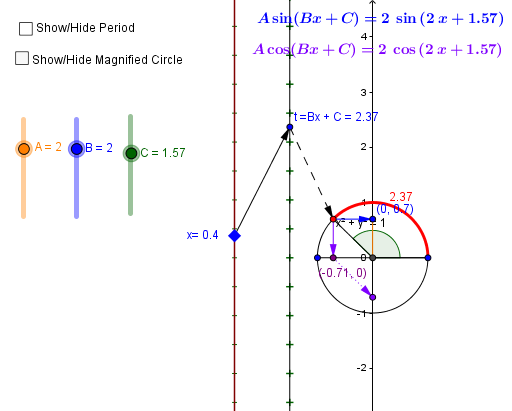
This example demonstrates the dynamic changes of trigonometric circles, involving core mathematical concepts such as trigonometric functions, circles, and vectors. Using GeoGebra commands like Point, Intersect, Circle, Segment, etc., it dynamically shows the graphs of A*sin(Bx+C) and A*cos(Bx+C). Suitable for high school mathematics teaching, especially in coordinate geometry and trigonometry.
GeoGebra Commands & Parameters
Point(q) → NIntersect(xAxis, yAxis) → A_1Circle(A_1, B_1) → cSegment(A_1, C_2) → aSegment(B_1, A_1) → bAngle(B_1, A_1, C_2) → αOrthogonalLine(C_2, yAxis) → dIntersect(d, yAxis) → DCircleArc(A_1, B_1, C_2) → eVector(C_2, D) → uVector(E, F) → vSegment(D, A_1) → hSegment(H, B_1) → iVector(t, C_2) → wOrthogonalLine(C_2, b) → jIntersect(j, i) → IVector(C_2, I) → zVector(I, J) → kVector(E, K) → lVector(L, K) → nVector(M, C_2) → pVector(N, t) → rVector(N, E) → sSequence(w, w, -6.283185307179586, 6.283185307179586, 0.5235987755982988) → pisZip((-2.5, p), p, pis) → list1Zip((-1.5, p), p, pis) → list2Vector(O, M) → u_1Vector(O, L) → v_1Vector(L, F) → w_1Segment(O, N) → a_1Segment(E, L) → b_1Segment(M, t) → c_1Dilate(e, A, A_1) → e'Dilate(c, A, A_1) → c'Dilate(C_2, A, A_1) → C'Dilate(I, A, A_1) → I'Dilate(D, A, A_1) → D'Vector(C', D') → mVector(C', I') → d_1Segment(C', C_2) → f_1Vector(F, Q) → e_1Vector(K, P) → h_1Dilate(H, A, A_1) → H'Dilate(B_1, A, A_1) → RSegment(H', R) → i'Dilate(J, A, A_1) → J'Vector(I', J') → i_1CircleArc(A_1, C_2, B_1) → k_1Dilate(k_1, A, A_1) → p_1
AI Drawing Prompt Reference
Draw a dynamic trigonometric circle showing sine and cosine functions, involving a circle, axes, points, and vectors. Construct using orthogonal lines and angles, demonstrating the relationship between trigonometric functions and the circle, suitable for high school math teaching.
The prompt above was compiled from the original drawing commands and is for reference only.