
Dynamic Demonstration of an Equilateral Triangle
Loading the math board and drawing, please wait…
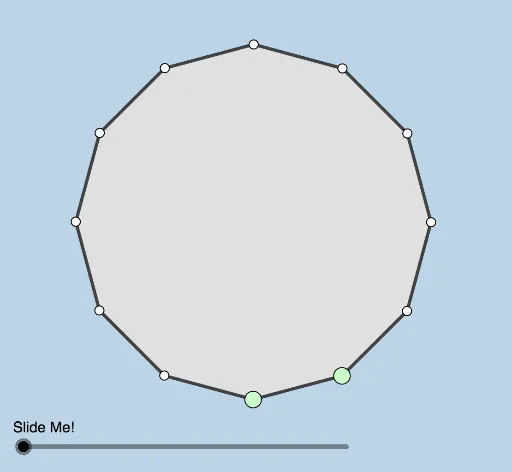
This example demonstrates how to dynamically construct and modify an equilateral triangle, showcasing its related properties. The core math concepts involved include properties of equilateral triangles, equations, numbers, exponents, quadratic equations, and coordinate geometry. Construction highlights involve using commands like Polygon, LineBisector, Intersect, Line, Rotate, Segment, Dilate, and Distance in GeoGebra. Suitable for high school mathematics teaching to help students understand the construction and properties of equilateral triangles.
GeoGebra Commands & Parameters
Polygon(A, B, 12) → poly1, f, p, q, r, C, D, E, F, G, H, I, g, J, K, L, h, i, j, k, l, m, nLineBisector(H, G) → sLineBisector(G, F) → tIntersect(s, t) → MLine(C, K) → bLine(H, I) → cRotate(poly1, If[0 < a ≤ 1, (a * π / 6), π / 6], M) → poly1'Rotate(A, If[0 < a ≤ 1, (a * π / 6), π / 6], M) → A'Rotate(B, If[0 < a ≤ 1, (a * π / 6), π / 6], M) → B'Segment(A', B') → f'Rotate(B, If[0 < a ≤ 1, (a * π / 6), π / 6], M) → B'_1Rotate(C, If[0 < a ≤ 1, (a * π / 6), π / 6], M) → C'Segment(B'_1, C') → g'Rotate(C, If[0 < a ≤ 1, (a * π / 6), π / 6], M) → C'_1Rotate(D, If[0 < a ≤ 1, (a * π / 6), π / 6], M) → D'Segment(C'_1, D') → h'Rotate(D, If[0 < a ≤ 1, (a * π / 6), π / 6], M) → D'_1Rotate(E, If[0 < a ≤ 1, (a * π / 6), π / 6], M) → E'Segment(D'_1, E') → i'Rotate(E, If[0 < a ≤ 1, (a * π / 6), π / 6], M) → E'_1Rotate(F, If[0 < a ≤ 1, (a * π / 6), π / 6], M) → F'Segment(E'_1, F') → j'Rotate(F, If[0 < a ≤ 1, (a * π / 6), π / 6], M) → F'_1Rotate(G, If[0 < a ≤ 1, (a * π / 6), π / 6], M) → G'Segment(F'_1, G') → k'Rotate(G, If[0 < a ≤ 1, (a * π / 6), π / 6], M) → G'_1Rotate(H, If[0 < a ≤ 1, (a * π / 6), π / 6], M) → H'Segment(G'_1, H') → l'Rotate(H, If[0 < a ≤ 1, (a * π / 6), π / 6], M) → H'_1Rotate(I, If[0 < a ≤ 1, (a * π / 6), π / 6], M) → I'Segment(H'_1, I') → m'Rotate(I, If[0 < a ≤ 1, (a * π / 6), π / 6], M) → I'_1Rotate(J, If[0 < a ≤ 1, (a * π / 6), π / 6], M) → J'Segment(I'_1, J') → n'Rotate(J, If[0 < a ≤ 1, (a * π / 6), π / 6], M) → J'_1Rotate(K, If[0 < a ≤ 1, (a * π / 6), π / 6], M) → K'Segment(J'_1, K') → p'Rotate(K, If[0 < a ≤ 1, (a * π / 6), π / 6], M) → K'_1Rotate(L, If[0 < a ≤ 1, (a * π / 6), π / 6], M) → L'Segment(K'_1, L') → q'Rotate(L, If[0 < a ≤ 1, (a * π / 6), π / 6], M) → L'_1Rotate(A, If[0 < a ≤ 1, (a * π / 6), π / 6], M) → A'_1Segment(L'_1, A'_1) → r'Dilate(C, If[1.5 < a ≤ 2.5, 2.5 - a, 0], K) → C'_2Segment(C, C'_2) → dRotate(F, π / 2, J) → F'_2Line(E, L) → q_1Line(B, J) → r_1Line(A, H) → s_1Intersect(r_1, q_1) → NDilate(B, If[2.5 < a ≤ 3.5, 3.5 - a, 0], N) → B'_2Segment(B, B'_2) → f_1Dilate(N, If[3.5 < a ≤ 4.5, 4.5 - a, 0], J) → N'Segment(N, N') → g_1Rotate(N, If[4.5 < a ≤ 5.5, ((a - 4.5) * π / 2), π / 2], J) → N'_1Rotate(N', If[4.5 < a ≤ 5.5, ((a - 4.5) * π / 2), π / 2], J) → N''Segment(N'_1, N'') → h_1Dilate(H, If[5.5 < a ≤ 6.5, 6.5 - a, 0], N) → H'_2Segment(H, H'_2) → i_1Dilate(N, If[6.5 < a ≤ 7.5, 7.5 - a, 0], A) → N'_2Segment(N, N'_2) → j_1Dilate(E, If[7.5 < a ≤ 8.5, 8.5 - a, 0], N) → E'_2Segment(E, E'_2) → k_1Dilate(N, If[8.5 < a ≤ 9.5, 9.5 - a, 0], L) → N'_3Segment(N, N'_3) → l_1Distance(H, E) → distanceHEDistance(E, NNN) → distanceENNNDistance(NNN, H) → distanceNNNHPolygon(NNN, E, H) → t1, h_2, nnn, e_1Rotate(E, If[10 < a ≤ 11, ((-(a - 10)) * π / 3), ((-π)) / 3], E) → E'_3Rotate(E'_2, If[10 < a ≤ 11, ((-(a - 10)) * π / 3), ((-π)) / 3], E) → OSegment(E'_3, O) → m_1
AI Drawing Prompt Reference
Draw a dynamic equilateral triangle to demonstrate its properties. Use a slider to control the size change of the triangle. Dynamically show the construction by rotating and using the perpendicular bisectors of the triangle's sides. Start with an initial equilateral triangle, then find the perpendicular bisector of one side and another, intersecting at a point to serve as the rotation center. Rotate the triangle based on the slider value, showing the rotated triangle dynamically. Finally, connect the rotated vertices and display related geometric properties.
The prompt above was compiled from the original drawing commands and is for reference only.