
Dynamic Demo of Regular Decagon and Pentadecagon
Loading the math board and drawing, please wait…
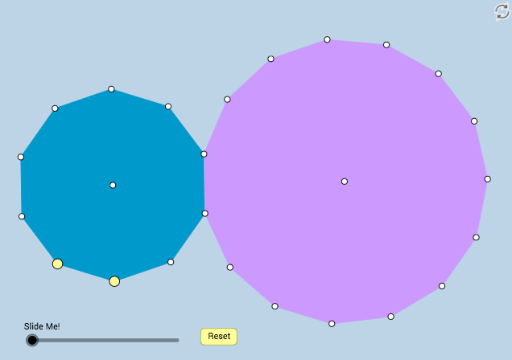
This example dynamically illustrates the geometric relationships and properties of a regular decagon and a regular pentadecagon. It involves core math concepts like polygons, angles, and geometric transformations. The construction uses commands such as Polygon, Segment, Circle, Center, Dilate, Rotate, and Angle in GeoGebra. Suitable for high school mathematics teaching or exploration by geometry enthusiasts.
GeoGebra Commands & Parameters
Polygon(A, B, 10) → poly1, f, p, C, D, E, F, G, H, I, J, g, h, i, j, k, l, m, nPolygon(E, D, 15) → poly2, q, f_1, g_1, h_1, i_1, j_1, k_1, K, L, M, N, r, O, P, Q, R, S, T, U, V, W, s, t, a, b, c, d, eSegment(D, E) → p_1Segment(E, F) → q_1Segment(D, K) → c_1Segment(K, L) → d_1Segment(L, M) → e_1Segment(M, N) → f_2Segment(N, O) → g_2Segment(O, P) → h_2Segment(P, Q) → i_2Segment(Q, R) → j_2Segment(R, S) → k_2Segment(S, T) → l_2Segment(T, U) → m_2Segment(U, V) → n_2Segment(V, W) → p_2Segment(W, E) → q_2Circle(A, B, C) → c_2Center(c_2) → ZCircle(L, M, N) → d_2Center(d_2) → A_1Dilate(Z, If[0 < o ≤ 1, 1 - o, 0], H) → Z'Segment(Z, Z') → l_1Rotate(poly1, If[1.5 < o ≤ 2.5, (((o - 1.5) * 36) * π / 180), (36 * π / 180)], Z) → poly1'Rotate(H, If[1.5 < o ≤ 2.5, (((o - 1.5) * 36) * π / 180), (36 * π / 180)], Z) → H'Segment(Z, H') → m_1Dilate(A_1, If[2.5 < o ≤ 3.5, 3.5 - o, 0], D) → B_1Segment(A_1, B_1) → n_1Rotate(poly2, If[3.5 < o ≤ 4.5, (((o - 3.5) * 24) * π / 180), (24 * π / 180)], A_1) → poly2'Rotate(A_1, If[3.5 < o ≤ 4.5, (((o - 3.5) * 24) * π / 180), (24 * π / 180)], A_1) → C_1Rotate(B_1, If[3.5 < o ≤ 4.5, (((o - 3.5) * 24) * π / 180), (24 * π / 180)], A_1) → D_1Segment(C_1, D_1) → r_1Polygon(F, E, W) → poly3, w, f_3, e_2Dilate(E, If[5 < o ≤ 6, 6 - o, 0], W) → E'Segment(E, E') → s_1Rotate(E, If[6 < o ≤ 7, ((o - 6) * π / 3), π / 3], E) → E'_1Rotate(E', If[6 < o ≤ 7, ((o - 6) * π / 3), π / 3], E) → E''Segment(E'_1, E'') → t_1Rotate(E, If[7 < o ≤ 8, (((o - 7) * 5) * π / 3), (5 * π / 3)], W) → E'_2Rotate(E', If[7 < o ≤ 8, (((o - 7) * 5) * π / 3), (5 * π / 3)], W) → E''_1Segment(E'_2, E''_1) → a_1Angle(A_1, K, Z) → αRotate(C_1, If[8 < o ≤ 9, (((o - 8) * 108) * π / 180), (108 * π / 180)], K) → E_1Rotate(D_1, If[8 < o ≤ 9, (((o - 8) * 108) * π / 180), (108 * π / 180)], K) → F_1Segment(E_1, F_1) → b_1
AI Drawing Prompt Reference
Draw a dynamic illustration showing the geometric relationships and properties of a regular decagon and a regular pentadecagon. Start by constructing two polygons and connecting their sides to form segments. Create a circle centered at the center of the decagon and perform scaling and rotation operations based on this center. Apply similar operations to the pentadecagon, including scaling, rotation, and connecting sides. Finally, display the angle relationships between the two polygons and use dynamic parameters to control the rotation and scaling, making the图形 dynamically change.
The prompt above was compiled from the original drawing commands and is for reference only.