
Dynamic Construction and Verification of Polygon Interior Angle Sum
Loading the math board and drawing, please wait…
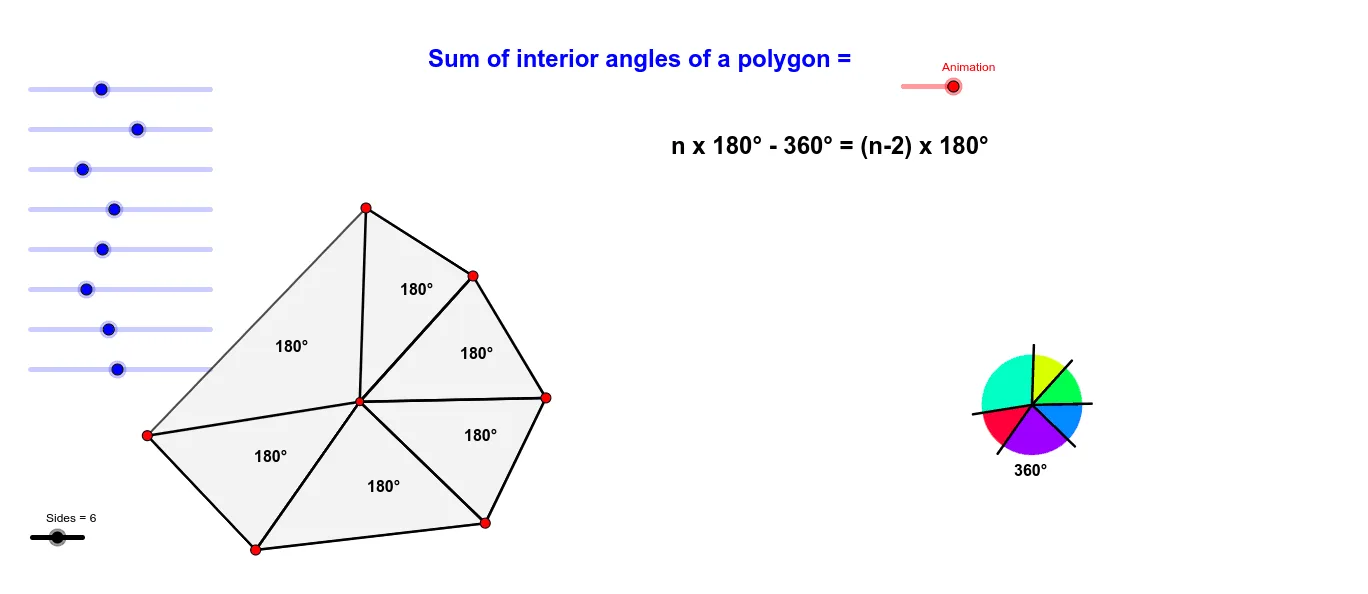
This example dynamically builds an n-sided polygon and measures the interior angles at its vertices, then visually verifies how the total interior angle sum depends on the number of sides. It focuses on the core geometry ideas of interior angles of polygons and the classic result that an n-gon has interior angle sum (n−2)·180°, using angle measurement and summation. The construction uses GeoGebra commands such as Polygon (to create the polygon and its vertex set), Centroid (to locate the center), Circle (to serve as a geometric scaffold), Sequence (to generate ordered parameters/values), CircleSector (to support angular placement around the circle), Translate (to reposition elements), Element (to extract/keep specific constructed components), and Join (to connect related objects). The interior angles are represented by angle objects (e.g., α, β, γ, δ, …) and aggregated while an Animation/parameter change updates the polygon and the displayed sum. Suitable for middle and high school geometry instruction, exploration tasks, and classroom demonstrations of geometric formulas through dynamic visualization.
GeoGebra Commands & Parameters
Take(l1, 1, Sides) → l2Polygon(l2) → poly1Centroid(poly1) → JCircle(J, 1) → cSequence(Segment[J, Element[l2, i]], i, 1, Length[l2]) → l3Sequence(Intersect[c, Element[l3, i]], i, 1, Length[l3]) → l5CircleSector(J, Element[l5, 1], Element[l5, Length[l5]]) → kSequence(Polygon[Element[l2, i], Element[l2, i + 1], J], i, 1, Length[l2]) → l4Polygon(Element[l2, Length[l2]], J, Element[l2, 1]) → t1, f, g, jTranslate(J, Vector[(Animation / 5 * Vector[J, I])]) → J'Circle(J, 1.2) → dSequence(Intersect[d, Element[l3, i]], i, 1, Length[l3]) → l6Sequence(CircleSector[J, Element[l5, i + 1], Element[l5, i]], i, 1, Length[l5]) → l7Sequence(Segment[J, Element[l6, i]], i, 1, Length[l6]) → l8Translate(l8, Vector[(Animation / 5 * Vector[J, I])]) → l8'Element(l7, A2) → B2Element(l7, A3) → B3Element(l7, A4) → B4Element(l7, A5) → B5Element(l7, A6) → B6Element(l7, A7) → B7Element(l7, A9) → B9Element(l7, A1) → B1Translate(B1, Vector[(Animation / 5 * Vector[J, I])]) → C1Translate(B2, Vector[(Animation / 5 * Vector[J, I])]) → C2Translate(B3, Vector[(Animation / 5 * Vector[J, I])]) → C3Translate(B4, Vector[(Animation / 5 * Vector[J, I])]) → C4Translate(B5, Vector[(Animation / 5 * Vector[J, I])]) → C5Translate(B6, Vector[(Animation / 5 * Vector[J, I])]) → C6Translate(B7, Vector[(Animation / 5 * Vector[J, I])]) → C7Translate(B8, Vector[(Animation / 5 * Vector[J, I])]) → C8Translate(B9, Vector[(Animation / 5 * Vector[J, I])]) → C9Translate(B10, Vector[(Animation / 5 * Vector[J, I])]) → C10Translate(B11, Vector[(Animation / 5 * Vector[J, I])]) → C11Join({l2, {A}}) → l9Polygon(l9) → poly2Sequence(Centroid[Element[l4, i]], i, 1, Length[l4]) → l10Centroid(t1) → KSequence(Text["180°", Element[l10, i]], i, 1, Length[l10]) → l11
AI Drawing Prompt Reference
Draw a polygon with a variable number of sides and observe how the sum of interior angles changes. First, create a polygon with adjustable sides, then measure each interior angle and calculate the sum. Use animation to change the number of sides and observe how the interior angle sum varies.
The prompt above was compiled from the original drawing commands and is for reference only.