
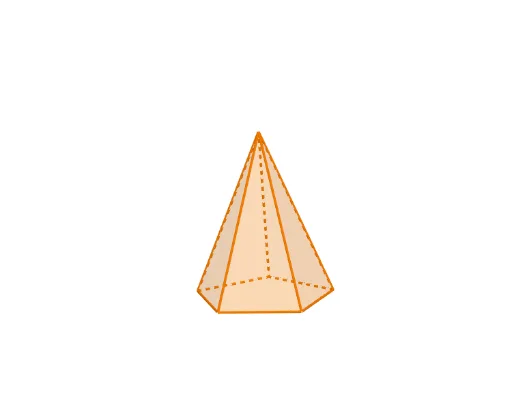
Dynamic Construction and Rotation of a Pentagonal Pyramid
Loading the math board and drawing, please wait…
In collections
P1 P2 立體圖形 / 3D Shapes
① This example demonstrates the construction of a pentagonal pyramid (regular pentagonal pyramid) and allows dynamic observation through rotation and sliders. ② Core mathematical concepts include solid geometry of pyramids, polygonal bases, triangular lateral faces, rotational symmetry, and geometric transformations controlled by parameters. ③ Construction highlights: GeoGebra commands such as Polygon create the pentagonal base, Pyramid generates the solid, Rotate performs rotation about an axis, Line helps define the rotation axis, If and Slider control dynamic display, and multiple point objects (e.g., ShapePt1~5) define base vertices, with ShapeBaseR representing the rotated base. ④ Suitable for upper secondary or early university students learning solid geometry, spatial visualization, and dynamic geometry software, also useful for demonstrations or exploring pyramid properties.
GeoGebra Commands & Parameters
Line((0, 1, 0), (0, 0, 0)) → RotateAxisIf(ShowChi, "依據立體底的形狀命名", "Naming by the base of the shape") → TextShowName2If(ShowChi, "立體高度", "Height") → TextSlider1If(ShowChi, "立體大小", "Size") → TextSlider2If(ShowChi, "立體位置(高低)", "Vertical Position") → TextSlider3If(ShowChi, "立體位置(橫向)", "Horizontal Position") → TextSlider4If(ShowChi, "施轉立體", "Rotate the shape") → TextSlider5If(ShowChi, "透明度", "Transparency") → TextSlider6Polygon(ShapePt1, ShapePt2, ShapePt3, ShapePt4, ShapePt5) → ShapeBase, shapept1, shapept2, shapept3, shapept4, shapept5Rotate(ShapeBase, S5, ShapePtAxis, RotateAxis) → ShapeBaseRIf(ShowChi, "五角錐體", "Pentagonal Pyramid") → TextName2Pyramid(ShapeBaseR, (S1 * S2)) → Shape, A, edge4, edge5, face1, face3, face4, face5, face2, edge1, edge2, edge3If(ShowChi, "角錐", "Pyramid") → TextName1
AI Drawing Prompt Reference
Create a regular pentagonal pyramid with a pentagon base defined by five vertices. Construct the solid from the rotated version of the base, using a height parameter and controls for the pyramid’s overall size, vertical position, and horizontal position. Set up a rotation axis passing through a chosen reference point, then add a rotation control so the base and pyramid rotate dynamically around that axis. Include an adjustable transparency slider and display a label indicating “Pentagonal Pyramid / 五角锥体”.
The prompt above was compiled from the original drawing commands and is for reference only.