
Dynamic Construction and Exploration of a Hexagonal Prism
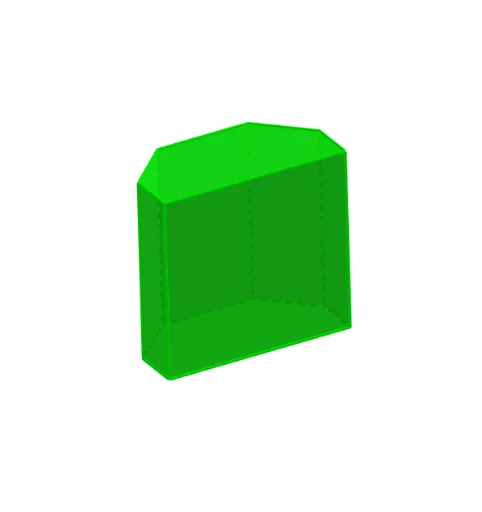
Loading the math board and drawing, please wait…
In collections
P1 P2 立體圖形 / 3D Shapes
This GeoGebra example illustrates the interactive construction of a hexagonal prism in 3D, enabling users to manipulate its dimensions and orientation through sliders and draggable points. The core mathematical concepts involve solid geometry, specifically the definition and properties of prisms, regular hexagonal bases, rotational symmetry, and parameter-driven transformations. The construction uses commands such as Line, Polygon, Rotate, and Prism to build the base and the solid, with numerous named points (ShapePt1a through ShapePt6a) and sliders (TextSlider1 to TextSlider6) providing dynamic control. Additional features include displaying statistical distributions (e.g., hypergeometric) and integral calculus elements, making it a versatile tool. This resource is ideal for high school to early college students to deepen understanding of 3D shapes, enhance spatial visualization, and explore parametric modeling in an interactive environment.
GeoGebra Commands & Parameters
Line((0, 1, 0), (0, 0, 0)) → RotateAxisIf(ShowChi, "依據立體底的形狀命名", "Naming by the base of the shape") → TextShowName2If(ShowChi, "立體高度", "Height") → TextSlider1If(ShowChi, "立體大小", "Size") → TextSlider2If(ShowChi, "立體位置(高低)", "Vertical Position") → TextSlider3If(ShowChi, "立體位置(橫向)", "Horizontal Position") → TextSlider4If(ShowChi, "透明度", "Transparency") → TextSlider6If(ShowChi, "旋轉立體", "Rotate the shape") → TextSlider5If(ShowChi, "用這圖形調節立體底部的形狀", "Adjust the base of the 3D shape by this figure.") → TextName3If(ShowChi, "六角柱體", "Hexagonal Prism") → TextName2Polygon(ShapePt1a, ShapePt2a, ShapePt3a, ShapePt4a, ShapePt5a, ShapePt6a) → ShapeBase2D, shapept1a, shapept2a, shapept3a, shapept4a, shapept5a, shapept6aPolygon(ShapePt1, ShapePt2, ShapePt3, ShapePt4, ShapePt5, ShapePt6) → ShapeBase, shapept1, shapept2, shapept3, shapept4, shapept5, shapept6Rotate(ShapeBase, S5, ShapePtAxis, RotateAxis) → ShapeBaseRPrism(ShapeBaseR, (S1 * S2)) → Shape, A, face5, face6, face2, faceABCDEF, edge1, edge2, edge3, edge4, edge5, edge6, B, edgeAB, edgeBC, edgeCD, edgeDE, edgeEF, edgeAF, C, D, E, F, face1, face3, face4If(ShowChi, "角柱", "Prism") → TextName1
AI Drawing Prompt Reference
Create a 3D hexagonal prism. First, draw a hexagon on a plane using six draggable vertices as the base. Then rotate the base around a vertical rotation axis to obtain the rotated base. Connect the two bases to form the prism solid, showing its side edges and the end faces. Include interactive controls (sliders) to adjust height, overall size, vertical position, horizontal position, transparency, and the rotation amount. Provide a way to drag a shape overlay to modify the hexagonal base geometry before forming the prism.
The prompt above was compiled from the original drawing commands and is for reference only.