
Drawing Angles Using a Protractor
Loading the math board and drawing, please wait…
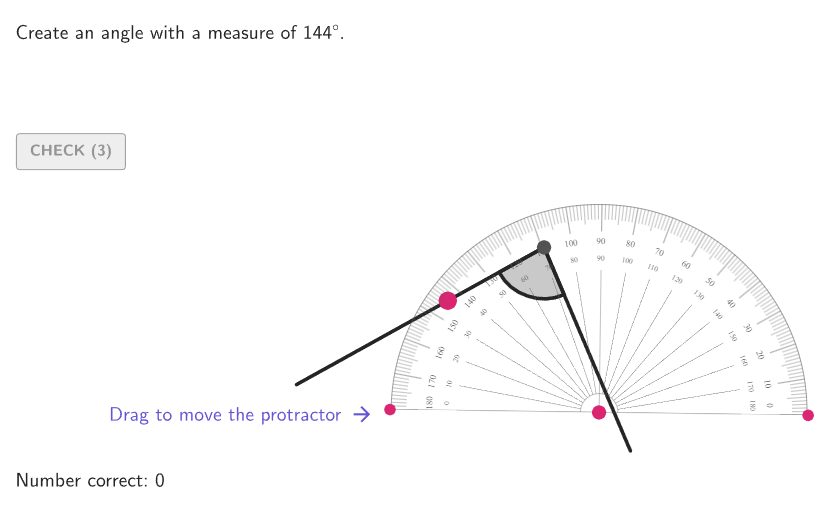
This example demonstrates how to draw angles of a given size using a protractor. The key mathematical concepts involve angle measurement and the fact that a circle measures 360 degrees. Construction involves using GeoGebra commands such as RandomUniform, Polygon, Angle, and others to create dynamic angle graphics. Suitable for elementary students or classroom practice to understand basic angle concepts and drawing techniques.
GeoGebra Commands & Parameters
RandomUniform(0, 0.99, 200) → allRandomSeeds, {0.8137602474657514, 0.3062438103764016, 0.6097102239064658, 0.06286411336398408, 0.2988247754887157, 0.3979910338126235, 0.10430735447183934, 0.22455033143884204, 0.8157351166778034, 0.8574047699951022, 0.6085637154155399, 0.9109049314721442, 0.26441995462471524, 0.5632592226993015, 0.1641216362149642, 0.4401293735704895, 0.11072879987039164, 0.928268329278164, 0.7441964283312047, 0.6789444513016941, 0.44118411757316145, 0.6812690993114908, 0.8256946371135659, 0.7856319890161692, 0.17196618147330567, 0.3303699866569479, 0.21253405057437724, 0.10600388249598819, 0.16979689348411547, 0.2861822613785002, 0.360560746387816, 0.7355138985765768, 0.7127687323656955, 0.559243301815275, 0.3434330234841677, 0.018060937197297688, 0.3242340127570959, 0.6229176360143929, 0.19750416697003143, 0.5365543503327381, 0.952625047711478, 0.002427951648928313, 0.9820853840188972, 0.37202093122125685, 0.7845196790988612, 0.5422196502190998, 0.8195079122393081, 0.1369292899848916, 0.7573966104676414, 0.21760405229983737, 0.7171271165299068, 0.3044918310663479, 0.7323446309618534, 0.24255213863309294, 0.6508242912498573, 0.2589754818586227, 0.43549439173176424, 0.31362642500601123, 0.04666093599162182, 0.7825118885411194, 0.18013554963008388, 0.410341240318355, 0.6141277029154869, 0.9015437373840272, 0.19936275840777976, 0.27473183810173224, 0.880904502020125, 0.8108782134368809, 0.4016621240018666, 0.39759052527427907, 0.4552108583436939, 0.725339898362658, 0.5491060706979806, 0.655693131567394, 0.9776747421532369, 0.17822462360950372, 0.18976736295150717, 0.31339225893189515, 0.9001852739100294, 0.032151827717003444, 0.1325943145070234, 0.18319330809602055, 0.9644197189127663, 0.1914975433343327, 0.9543074284389776, 0.27335780192458387, 0.21764685184713856, 0.39636109191762775, 0.753883483189296, 0.9661931208960345, 0.2680083871985672, 0.03597795737447448, 0.2608866171300605, 0.19849080996821036, 0.735767781871102, 0.19463749189374815, 0.7392867218020394, 0.5755658396593714, 0.10098959539823986, 0.505498228506839, 0.18847368255916733, 0.8325266958415479, 0.5217753962176087, 0.377215119246303, 0.6879322064582051, 0.0007720831959965035, 0.22053121521557287, 0.3650018670830243, 0.701485118221244, 0.9542615241029143, 0.12877914522591474, 0.4216481314496633, 0.3411436170438701, 0.30884886485664, 0.18375008237875945, 0.5550950972497956, 0.9494219255483315, 0.858894206218004, 0.11240643648424072, 0.2974450187500107, 0.20247919802241368, 0.6784856581079791, 0.23064400941129534, 0.015738315782320638, 0.9646449339515825, 0.649905011837268, 0.9072084087855885, 0.7574794605575633, 0.007765258214203629, 0.8294612226979688, 0.14333664851556782, 0.8137259119751014, 0.436375469799075, 0.9404940794959553, 0.07029656830950089, 0.45957633013450344, 0.2519603034280163, 0.2252147142548106, 0.6178460453157782, 0.9061032305187183, 0.39650680293788537, 0.941103362911431, 0.9571712328854733, 0.5491714985813986, 0.3571852914052726, 0.5338242055430454, 0.05208809669862052, 0.6391686073538666, 0.040312422647207004, 0.04704524621032214, 0.6122025421038207, 0.8514433847097609, 0.1837564021073334, 0.2601664151350334, 0.691325569096488, 0.8202093268154741, 0.9526371543408872, 0.3777615666791719, 0.14372525204447423, 0.7788153074876507, 0.9435559972088063, 0.4095307348409308, 0.6997737650583599, 0.1466197177252994, 0.5676568959914017, 0.046736167730034285, 0.9112080502612911, 0.4872265212612964, 0.8325777413908454, 0.6904613442793492, 0.4545738116243559, 0.02454987531813154, 0.49779324375625444, 0.8485847723072109, 0.5894584548947781, 0.04207079128561589, 0.746981964981508, 0.6621004818035886, 0.1258442526649966, 0.3067335438312079, 0.17486843910331007, 0.8373451445289917, 0.4523240409268853, 0.5422005151598844, 0.05449692336593456, 0.6788066085331007, 0.5040223391374213, 0.416643417983654, 0.9440870618136158, 0.9274916027053689, 0.8158512566047948, 0.5078954025990042, 0.2605022466195847, 0.7023208076198433, 0.4732054265048332, 0.7736224055516332, 0.458930100312238, 0.4466965933629691, 0.4383623738933385, 0.8861935347347519}Polygon({(-4.5, -3.7), (4.5, -3.7), (4.5, 3.7), (-4.5, 3.7)}) → graphicAreaSequence(((2 * cos(ii)), (2 * sin(ii))), ii, 0°, 360°, 1°) → PointsRayMovablePoint(PointsRayMovable) → EndPointRay2Take(allRandomSeeds, randIndex, randIndex + numRandoms - 1) → currentRandomSeedsSequence(((2 * cos(ii)), (2 * sin(ii))), ii, 5°, 360°, 2°) → PointsRayFixedElement(PointsRayFixed, randomNum2) → EndPointRay1IntersectPath(Ray[Center, EndPointRay1], graphicArea) → Ray1If(Defined[Slope[Ray1]], y ≥ (Slope[Ray1] * x), x ≥ 0) → reg1Min(Angle[Vector[EndPointRay1], Vector[(1, 0)]], Angle[Vector[(1, 0)], Vector[EndPointRay1]]) → rotAngleRightProtSequence(10, 175, 1) → anglesElement(angles, randomNum1) → randomAngleDilate(EndPointRay1, r / 2) → IniCorrectArcRotate(IniCorrectArc, (randomAngle° * If[RotateRight, 1, -1])) → EndCorrectArcCircle(ProtractorCenter_{1}, r) → ProtractorCircle_{1}Point(ProtractorCircle_{1}) → ProtractorLeft_{1}DynamicCoordinates(ProtractorLeft_{1}, x(ProtractorLeft_{1}), y(ProtractorLeft_{1})) → ProtractorLeftDyn_{1}Point(ProtractorCircle_{1}) → ProtractorRight_{1}DynamicCoordinates(ProtractorRight_{1}, x(ProtractorRight_{1}), y(ProtractorRight_{1})) → ProtractorRightDyn_{1}Arc(ProtractorCircle_{1}, ProtractorRightDyn_{1}, ProtractorLeftDyn_{1}) → cIntersect(c, LineBisector[ProtractorRightDyn_{1}, ProtractorLeftDyn_{1}]) → D, EIf(x(D) ≥ 0 ∧ y(D) ≥ 0, If[standardSol, 1, 3], x(D) < 0 ∧ y(D) ≥ 0, If[standardSol, 2, 4], x(D) < 0 ∧ y(D) < 0, If[standardSol, 3, 1], If[standardSol, 4, 2]) → quadrantProtractorCenterDilate(Dilate[EndPointRay1, r / 2], 1.02) → IniIncorrectArcAngle(Vector[EndPointRay1], Vector[EndPointRay2]) → angleToShowTextfield(input1) → InputBox1Corner(5) → layoutAppSizesectorPixels(A, B, C, haloPixels + 40, Corner[1], Corner[3], Corner[5]) → pulsingObjectsectorPixels(A, B, C, 40, Corner[1], Corner[3], Corner[5]) → displayAnglePointToPixels(Corner[onboardingDisplayText, 2], Corner[1], Corner[3], Corner[5]) → layoutOnboardingonboardingTextOffset(Corner[onboardingText, 1], Corner[onboardingText, 3], onboardingCase, Corner[1], Corner[3], Corner[5]) → OnboardingTextOffsetIntersectPath(Ray[Center, EndPointRay2], graphicArea) → Ray2Translate((0, 0), v) → LabelPosAngleToShowIf(quadrantProtractorCenter ≟ 4, If[altSol, 4, 2], quadrantProtractorCenter ≟ 2, If[altSol, 2, 4], quadrantProtractorCenter ≟ 3, If[altSol, 3, 1], If[altSol, 1, 3]) → quadrantLegendElement(LegendPositions, quadrantLegend) → Legend2Translate(Legend1, (0, -0.5)) → Legend3Translate(Legend2, (0, -0.5)) → Legend4Segment(Legend2, Legend1) → segmentLegendCorrectSegment(Legend4, Legend3) → segmentLegendIncorrectText("\textsf{ Correct solution\\}", Legend1, true, true, If[2 ≤ quadrantLegend ≤ 3, -1, 1], 0) → legendCorrectText("\textsf{ Your solution\\}", Legend3, true, true, If[2 ≤ quadrantLegend ≤ 3, -1, 1], 0) → legendIncorrectSector(x^(2) + y^(2) = Distance[Center, IniCorrectArc]^(2), IniCorrectArc, EndCorrectArc) → CorrectArc1Sector(x^(2) + y^(2) = Distance[Center, IniCorrectArc]^(2), EndCorrectArc, IniCorrectArc) → CorrectArc2Dilate(Dilate[EndPointRay2, r / 2], 1.02) → EndIncorrectArcArc(x^(2) + y^(2) = Distance[Center, IniIncorrectArc]^(2), IniIncorrectArc, EndIncorrectArc) → IncorrectArc1Arc(x^(2) + y^(2) = Distance[Center, IniIncorrectArc]^(2), EndIncorrectArc, IniIncorrectArc) → IncorrectArc2Segment(Center, EndIncorrectArc) → segmentCorrectText((input1 * "°"), (x(Dilate[EndIncorrectArc, 1.1]), Max[y(Dilate[EndIncorrectArc, 1.1]), -3.55]), true, true, 0, 0) → labelPointIncorrectRotate(IniCorrectArc, ((anim * randomAngle°) * If[RotateRight, 1, -1])) → IniCorrectArc'Arc(x^(2) + y^(2) = Distance[Center, IniCorrectArc]^(2), IniCorrectArc, IniCorrectArc') → arcAnim1Arc(x^(2) + y^(2) = Distance[Center, IniCorrectArc]^(2), IniCorrectArc', IniCorrectArc) → arcAnim2circlePixels(ProtractorLeftDyn_{1}, 5 + (7 * pulsing), Corner[1], Corner[3], Corner[5]) → pulsingObjectLeftcirclePixels(ProtractorRightDyn_{1}, 5 + (7 * pulsing), Corner[1], Corner[3], Corner[5]) → pulsingObjectRightcirclePixels(ProtractorCenter_{1}, 5 + (7 * pulsing), Corner[1], Corner[3], Corner[5]) → pulsingObjectCenterText("\alpha", LabelPosAngleToShow, true, true, 0, 0) → labelAngleToShowMirror(IniIncorrectArc, Line[(0, 0), EndPointRay1]) → IniIncorrectArc'Mirror(EndIncorrectArc, Line[(0, 0), EndPointRay1]) → EndIncorrectArc'Mirror(EndIncorrectArc, Line[(0, 0), EndPointRay1]) → EndIncorrectArc'_{1}Mirror(IniIncorrectArc, Line[(0, 0), EndPointRay1]) → IniIncorrectArc'_{1}Mirror(IniCorrectArc, Line[(0, 0), EndPointRay1]) → IniCorrectArc'_{1}Mirror(EndCorrectArc, Line[(0, 0), EndPointRay1]) → EndCorrectArc'Mirror(EndCorrectArc, Line[(0, 0), EndPointRay1]) → EndCorrectArc'_{1}Mirror(IniCorrectArc, Line[(0, 0), EndPointRay1]) → IniCorrectArc'_{2}Min(Angle[Vector[EndPointRay1], Vector[(-1, 0)]], Angle[Vector[(-1, 0)], Vector[EndPointRay1]]) → rotAngleLeftProtRotate(pic1, 180°) → pic1'Segment(Center, IniCorrectArc') → segAnimSector(Mirror[x^(2) + y^(2) = Distance[Center, IniCorrectArc]^(2), Line[(0, 0), EndPointRay1]], IniCorrectArc'_{1}, EndCorrectArc') → CorrectArc1'Sector(Mirror[x^(2) + y^(2) = Distance[Center, IniCorrectArc]^(2), Line[(0, 0), EndPointRay1]], EndCorrectArc'_{1}, IniCorrectArc'_{2}) → CorrectArc2'circlePixels(EndPointRay2, 9 + (7 * pulsing), Corner[1], Corner[3], Corner[5]) → pulsingObjectAngle
AI Drawing Prompt Reference
Draw a coordinate-plane graphic showing a protractor-style angle construction. Use a fixed center point and a circle of radius r, then create two rays from the center whose endpoints lie on the circle. Build a protractor arc on the circle between the two ray endpoints, and use the bisector of the two rays to decide which quadrant the arc center belongs to, placing the protractor marking accordingly. Compute and display the angle formed by the two rays at the center, with a text input allowing the angle value to vary. Also show two arcs for comparison: a “correct” arc obtained by rotating the initial arc by the chosen angle, and a “your solution” arc coming from the second ray; connect relevant points to the center with short segments and add two labeled texts indicating Correct solution and Your solution.
The prompt above was compiled from the original drawing commands and is for reference only.