
Drawing a Square with Epicycles
Loading the math board and drawing, please wait…
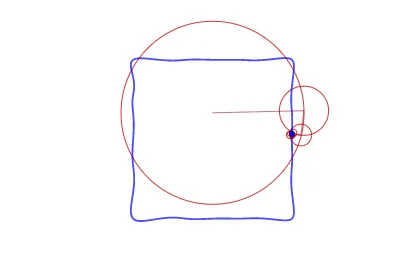
This example uses the Discrete Fourier Transform to draw a square. It demonstrates the concepts of complex numbers and rotation. By a series of circular motions, using GeoGebra commands such as Sequence, Reverse, Zip, First, Join, Last, and PolyLine, the outline of a square can be constructed. Suitable for high school mathematics education, particularly in complex numbers and geometric construction.
GeoGebra Commands & Parameters
Sequence(N) → LNReverse(Sort[Zip[(abs(F), n), F, LF, n, LN]]) → LAsZip(y(As), As, LAs) → LjSequence(1, M) → LmFirst(Zip[Element[Lk, j], j, Lj], M) → LksFirst(Zip[Element[LF, j], j, Lj], M) → LFsFirst(Zip[x(As), As, LAs], M) → LRsZip(Sum[Zip[(abs(F); arg(F) + (k * t)), F, First[LFs, m], k, Lks]], m, Lm) → LC1Join({{(0, 0)}, LC1}) → LCLast(LC) → PlastPolyLine(LC) → PolyLZip(Circle[Element[LC, m], R], m, Lm, R, LRs) → EpicyclesSum(Zip[(x(F) * cos((k * x))) - (y(F) * sin((k * x))), F, LFs, k, Lks]) → fxSum(Zip[(x(F) * sin((k * x))) + (y(F) * cos((k * x))), F, LFs, k, Lks]) → fyCurveCartesian(fx(t), fy(t), t, 0, (2 * π)) → orbit
AI Drawing Prompt Reference
Draw a square outline formed by a series of rotating circles. Start with a set of complex points sorted by decreasing magnitude. Each point defines a circle whose radius equals the point's magnitude, and whose center is placed at the end of the previous circle. All circles rotate simultaneously, with angular speed proportional to their index and opposite direction. The sum of these circular motions traces a square path at the final endpoint. Also show the complete trajectory of that endpoint as a smooth curve over time, while keeping all circles and their center connections visible, resembling a mechanical arm.
The prompt above was compiled from the original drawing commands and is for reference only.