
Draggable Intercepts for Standard-Form Graphing
Loading the math board and drawing, please wait…
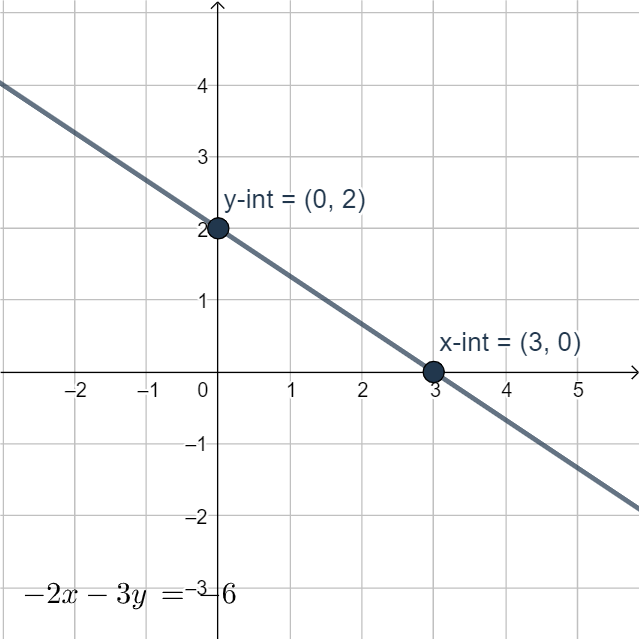
This example demonstrates how to graph a standard-form relationship by using draggable intercepts, showing how moving key points updates the resulting line/graph in real time. The key math ideas are graphing via coordinate geometry, the role of intercepts in defining a function’s position, and representing algebraic parameters through interactive geometric construction. Construction-wise, it creates Point objects (A, B) that can be dragged, and uses a Line object (g) determined by those points; a Text object (text1) is used for labeling or displaying the current standard-form information. Suitable for middle and high school learning of function graphs and linear relationships, and for classroom demonstrations or interactive practice where students connect formula parameters to visual graph changes.
GeoGebra Commands & Parameters
Point(yAxis) → APoint(xAxis) → BLine(B, A) → g
AI Drawing Prompt Reference
Draw a line that passes through two draggable points, one on the y-axis and the other on the x-axis, and display the equation of the line. The line updates in real time as the points are dragged, showing how to graph using coordinate geometry and explaining the role of intercepts in defining a function's position.
The prompt above was compiled from the original drawing commands and is for reference only.