
Dot Product of Vectors: Geometric Visualization
Loading the math board and drawing, please wait…
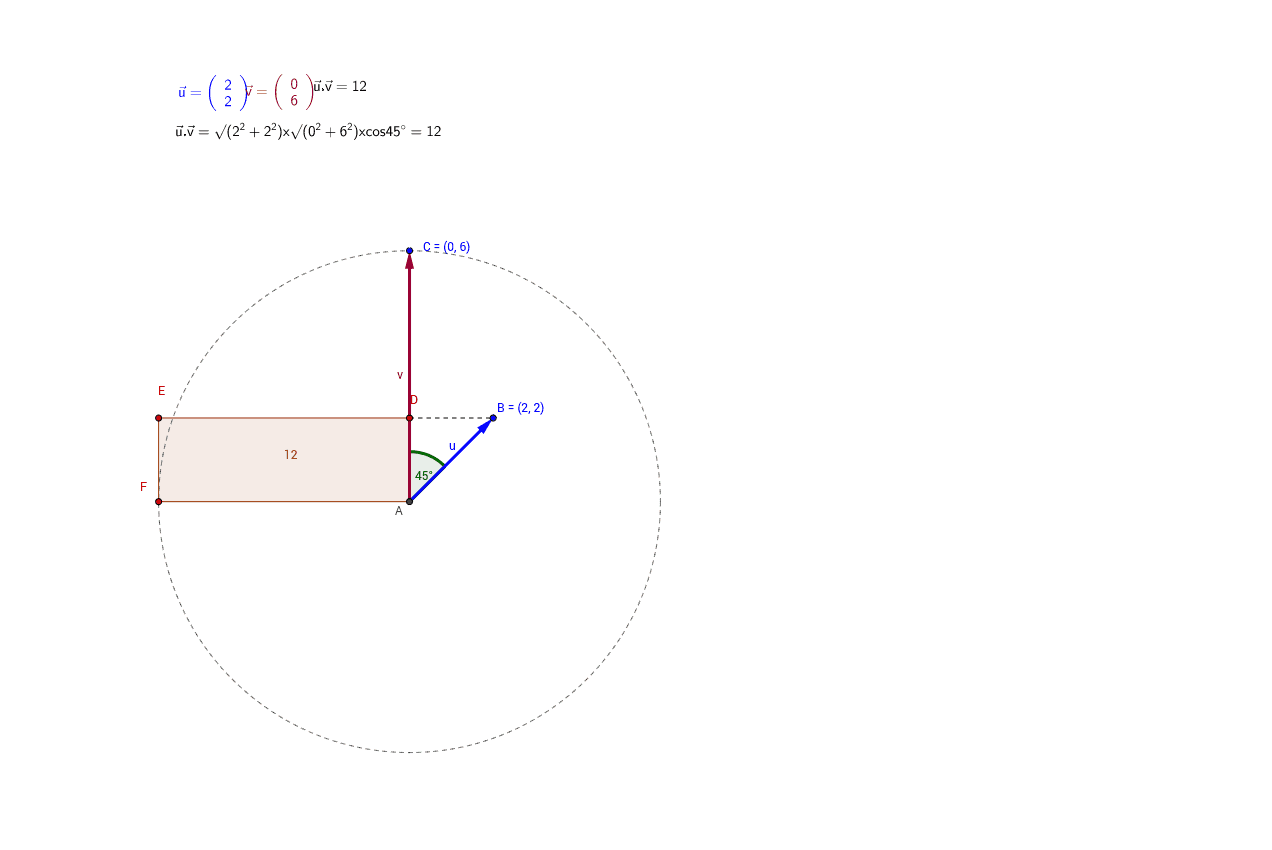
This example dynamically demonstrates the dot product of two‑dimensional vectors and its geometric meaning. By dragging vector endpoints the projection length and cosine of the included angle update in real time. Core concepts covered include vector operations, the definition of the dot product, the cosine law for angles, planar coordinate geometry, and basic trigonometry. Construction uses GeoGebra commands Vector, Angle, Circle, Rotate, OrthogonalLine, Segment, Polygon, Translate, Intersect, and Line to create projection segments, rectangles, auxiliary circles, and angle markers; key objects are A, B, C, D, E, F, G, H, u, v, α, β, γ, and dotproduct. Suitable for high‑school vector and analytic geometry lessons, introductory linear algebra visual aids, and self‑study of the dot product.
GeoGebra Commands & Parameters
Intersect(xAxis, yAxis) → AVector(A, B) → uVector(A, C) → vAngle(B, A, C) → αCircle(A, C) → cRotate(C, 90.0*°, A) → FAngle(C, A, F) → βLine(A, F) → eOrthogonalLine(B, v) → fLine(A, C) → gIntersect(g, f) → DOrthogonalLine(F, f) → hIntersect(h, f) → EPolygon(A, D, E, F) → rectangle, a_1, f_1, g_1, c'_1Vector(G, H) → wTranslate(G, w) → G'Translate(A, w) → A'Translate(B, w) → B'Translate(C, w) → C'Vector(A', B') → u'Vector(A', C') → v'Rotate(B', α, A') → B''Angle(B', A', B'') → γCircle(A', B') → kOrthogonalLine(C', u') → iOrthogonalLine(C', i) → jOrthogonalLine(A', j) → lIntersect(i, j) → ILine(A', B') → nOrthogonalLine(A', u') → pOrthogonalLine(I, p) → qOrthogonalLine(B', q) → rLine(A', B') → dOrthogonalLine(A', d) → sOrthogonalLine(B', d) → tOrthogonalLine(I, d) → c_1Segment(D, B) → d_1Intersect(c_1, d) → LCircle(A', L) → e_1Intersect(k, s) → F', KOrthogonalLine(I, u') → b_1OrthogonalLine(F', b_1) → h_1Intersect(h_1, b_1) → E'Intersect(e_1, b_1) → D', OPolygon(A', F', E', O) → Vieleck1, a', j_1, m_1, oSegment(I, O) → i_1
AI Drawing Prompt Reference
Create a geometric visualization of the dot product of two 2‑D vectors. Start with an origin point and draw vector u to a point on the plane and vector v to another point, forming the angle between them. Show the projections of each vector onto the other, and use these projections to construct a rectangle. Add auxiliary circles and angle markers to illustrate the cosine of the angle and the relationship defined by the dot product. Include additional translated copies of the vectors and related construction lines to highlight the algebraic and geometric interpretations. The final drawing should clearly display the vectors, their angle, the projection lengths, the rectangle formed by the projections, and the supporting geometric elements that help students understand the dot product concept.
The prompt above was compiled from the original drawing commands and is for reference only.