
Domain and Range of a Function by Guillermo Bautista
Loading the math board and drawing, please wait…
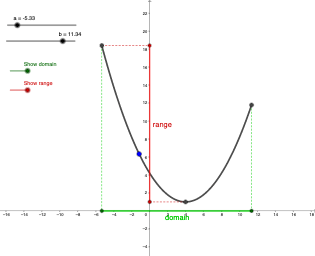
This example demonstrates how to use GeoGebra to draw the graph of a function and illustrate its domain and range. Key mathematical concepts include functions, function graphs, domain, and range. It utilizes commands such as Point, Segment, Min, Max, and Midpoint. Suitable for high school mathematics education and learning.
GeoGebra Commands & Parameters
Point(f) → A_{1}Segment(C, D) → hMin(f, x(A), x(B)) → MMax(y(A), y(B)) → mxSegment(F, E) → iMidpoint(C, D) → GMidpoint(F, E) → HSegment(A, F) → jSegment(M, E) → kSegment(A, C) → lSegment(B, D) → mSegment(B, F) → n
AI Drawing Prompt Reference
Draw the graph of a function and illustrate its domain and range. Start by drawing the function's graph, then select two points A and B on the graph to draw the boundary segment for the domain. Find the minimum x-coordinate M and the maximum y-coordinate mx of points A and B, and draw a segment connecting M and mx. Next, find the midpoints G and H of segments AB and EF, and draw the boundary segment for the range using G and H. Finally, connect points A, B, C, D, and F to form the complete figure.
The prompt above was compiled from the original drawing commands and is for reference only.