
Discs Sphere - 12 Discs: Approximating a Sphere with Rotated Discs
Loading the math board and drawing, please wait…
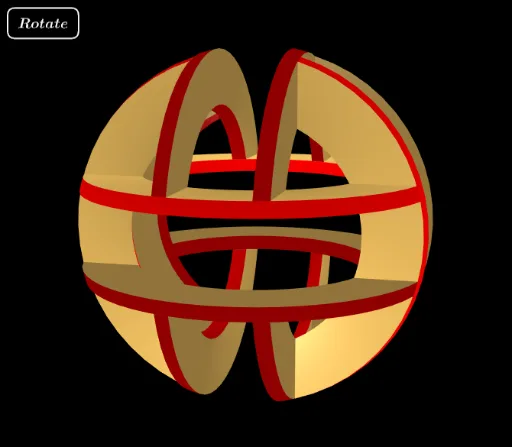
This GeoGebra example demonstrates how a sphere can be approximated by twelve circular discs arranged in 3D space, providing a visual and interactive representation of a discretized spherical surface. The core mathematical concepts involve the equation of a sphere, parametric surfaces, rotational transformations, and the use of cosine functions to position the discs around the sphere. The construction uses GeoGebra commands such as Sphere to define the base sphere, CurveCartesian to outline each disc's boundary, Surface to generate the disc faces, and Line with Rotate to place and orient the discs in space. Numerous auxiliary objects (e.g., butSetUp, b, d, R, O, e, r) and surface objects (surfAz, surfBz, surf1z, surfRz, etc.) are defined to build the top and bottom faces of each disc. This example is suitable for high school or undergraduate students studying solid geometry, 3D modeling, or mathematical visualization, helping them grasp the relationship between a sphere and its planar approximations, as well as the practical use of parametric surfaces and geometric transformations.
GeoGebra Commands & Parameters
Sphere(O, 1) → eSphere(O, R) → rCurveCartesian((1; (arg(A1) * φ); alt(A1)), φ, -1, 1) → cA1CurveCartesian((R; (arg(AR) * φ); alt(AR)), φ, -1, 1) → cARCurveCartesian((1; (arg(B1) * φ); alt(B1)), φ, -1, 1) → cB1CurveCartesian((R; (arg(BR) * φ); alt(BR)), φ, -1, 1) → cBRSurface(((1 - s) * cA1(t)) + (s * cB1(t)), s, 0, 1, t, -1, 1) → s1hSurface((s * cAR(t)) + ((1 - s) * cBR(t)), s, 0, 1, t, -1, 1) → sRhLine(O, (1, 1, 1)) → L111Surface(((1 - s) * cAR(t)) + (s * cA1(t)), s, 0, 1, t, -1, 1) → surfAzSurface((s * cBR(t)) + ((1 - s) * cB1(t)), s, 0, 1, t, -1, 1) → surfBzSurface((1; arg(s1h(s, t)); alt(s1h(s, t))), s, 0, 1, t, -1, 1) → surf1zSurface((R; arg(sRh(s, t)); alt(sRh(s, t))), s, 0, 1, t, -1, 1) → surfRzRotate(surfAz, 120°, L111) → surfAxRotate(surfBz, 120°, L111) → surfBxRotate(surf1z, 120°, L111) → surf1xRotate(surfRz, 120°, L111) → surfRxRotate(surfAz, (-(120°)), L111) → surfAyRotate(surfBz, (-(120°)), L111) → surfByRotate(surf1z, (-(120°)), L111) → surf1yRotate(surfRz, (-(120°)), L111) → surfRyRotate(surfAz, 180°, xAxis) → surfAz1Rotate(surfBz, 180°, xAxis) → surfBz1Rotate(surf1z, 180°, xAxis) → surf1z1Rotate(surfRz, 180°, xAxis) → surfRz1Rotate(surfAx, 180°, xAxis) → surfAx1Rotate(surfBx, 180°, xAxis) → surfBx1Rotate(surf1x, 180°, xAxis) → surf1x1Rotate(surfRx, 180°, xAxis) → surfRx1Rotate(surfAy, 180°, xAxis) → surfAy1Rotate(surfBy, 180°, xAxis) → surfBy1Rotate(surf1y, 180°, xAxis) → surf1y1Rotate(surfRy, 180°, xAxis) → surfRy1Rotate(surfAz, 180°, yAxis) → surfAz2Rotate(surfBz, 180°, yAxis) → surfBz2Rotate(surf1z, 180°, yAxis) → surf1z2Rotate(surfRz, 180°, yAxis) → surfRz2Rotate(surfAx, 180°, yAxis) → surfAx2Rotate(surfBx, 180°, yAxis) → surfBx2Rotate(surf1x, 180°, yAxis) → surf1x2Rotate(surfRx, 180°, yAxis) → surfRx2Rotate(surfAy, 180°, yAxis) → surfAy2Rotate(surfBy, 180°, yAxis) → surfBy2Rotate(surf1y, 180°, yAxis) → surf1y2Rotate(surfRy, 180°, yAxis) → surfRy2Rotate(surfAz, 180°, zAxis) → surfAz3Rotate(surfBz, 180°, zAxis) → surfBz3Rotate(surf1z, 180°, zAxis) → surf1z3Rotate(surfRz, 180°, zAxis) → surfRz3Rotate(surfAx, 180°, zAxis) → surfAx3Rotate(surfBx, 180°, zAxis) → surfBx3Rotate(surf1x, 180°, zAxis) → surf1x3Rotate(surfRx, 180°, zAxis) → surfRx3Rotate(surfAy, 180°, zAxis) → surfAy3Rotate(surfBy, 180°, zAxis) → surfBy3Rotate(surf1y, 180°, zAxis) → surf1y3Rotate(surfRy, 180°, zAxis) → surfRy3
AI Drawing Prompt Reference
Draw a sphere approximated by 12 rotated discs. Start by creating a sphere with a radius of 1, then define the boundary of each disc using parametric curves, and generate the disc surfaces. Rotate these surfaces to place them in 3D space, forming an approximation of the sphere.
The prompt above was compiled from the original drawing commands and is for reference only.