
Discovering Sine, Cosine, and Tangent in Right Triangles
Loading the math board and drawing, please wait…
In collections
Similarity, Right Triangles, and Trigonometry (SRT) Cluster
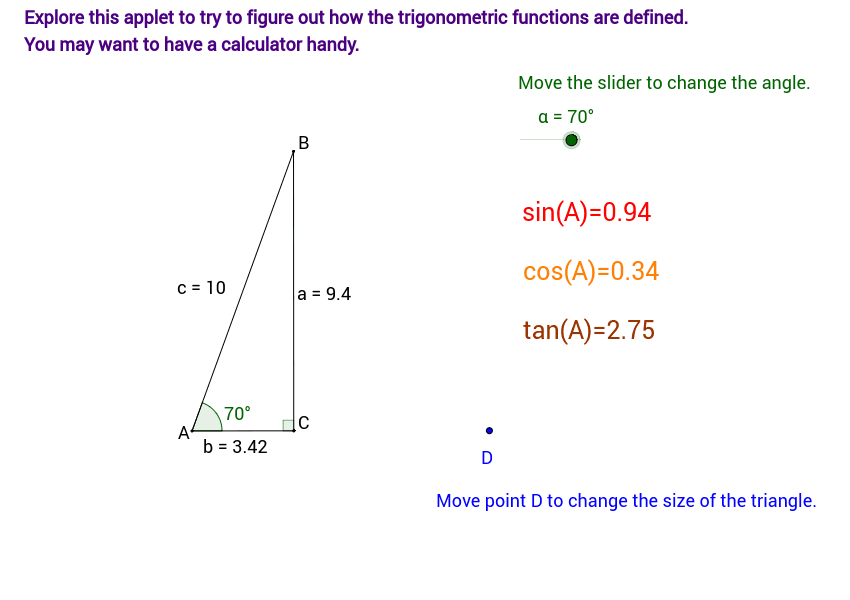
This example demonstrates how changing the angle measures (in intervals of 10 degrees) of a right triangle with a hypotenuse of 10 units reveals the behavior of sine, cosine, and tangent functions. Key math concepts include trigonometric functions, right triangles, angle measurement, and geometric construction. It uses commands like Circle, Segment, Rotate, Angle, OrthogonalLine, and Intersect to visualize and analyze the relationships. Suitable for high school students exploring the definitions and properties of trigonometric functions and the impact of angle changes on function values.
GeoGebra Commands & Parameters
Circle(A, D) → c_1Segment(A, D) → a_1Rotate(D, α, A) → BAngle(D, A, B) → βSegment(A, B) → cOrthogonalLine(B, a_1) → dIntersect(a_1, d) → CAngle(B, C, A) → γSegment(C, B) → aSegment(C, A) → b
AI Drawing Prompt Reference
Draw a right triangle with one side of length 10, rotating one of its sides to show how the triangle's three sides change as the angle varies from 0 to 90 degrees, revealing the behavior of sine, cosine, and tangent functions. Start by drawing a line segment of length 10 as the hypotenuse, then use a circle centered at one endpoint to find the rotated vertex, forming the right triangle. Next, draw a perpendicular line to the hypotenuse, find the intersection point, and use it to construct the other sides of the triangle, finally displaying the relationships between the angles and their corresponding side lengths.
The prompt above was compiled from the original drawing commands and is for reference only.