
Disc Action!!! Volumes of Revolution: The Disc Method
Loading the math board and drawing, please wait…
In collections
BC Calculus
GeoGebra 3D & AR: PreCalc & Calculus Resources
Calculus Concepts
Volume of Revolution
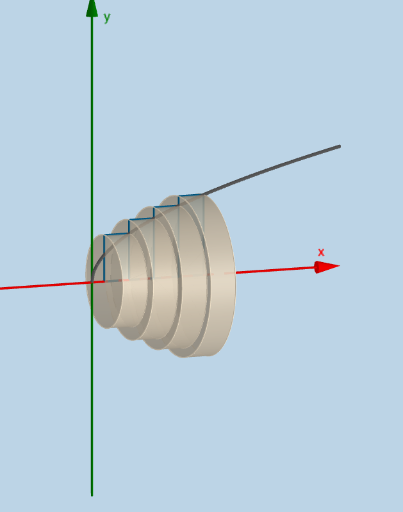
① This dynamic and modifiable GeoGebra applet vividly demonstrates the disc method for computing volumes of solids of revolution, where a plane region is rotated about an axis to form a 3D solid. ② The core mathematical concept is the application of definite integrals to calculate volume, specifically by slicing the solid into thin circular discs and summing their volumes via integration, involving functions, intervals, axis of rotation, and volume elements. ③ Construction highlights: from the construction summary, commands such as Sequence, Rotate, Intersect, Polygon, Circle, Surface, Cylinder, Dilate, Segment, Textfield, and Integral are used to build the function f, interval [a,b], number of subdivisions n, thickness deltax, a list of discs (list1), and the resulting surface, with sliders and text fields for interactive parameter adjustment. ④ Suitable for advanced high school to early college calculus students to grasp the geometric meaning of the volume formula, and for teachers as a classroom demonstration or for self-directed exploration.
GeoGebra Commands & Parameters
Sequence(Polygon[(a + (i * deltax), 0), (a + ((i + 1) * deltax), 0), (a + ((i + 1) * deltax), f(a + ((i + 1) * deltax))), (a + (i * deltax), f(a + ((i + 1) * deltax)))], i, 0, n - 1, 1) → list1Rotate(list1, α, y = 0) → list1'Intersect(i, l) → BIntersect(k, l) → CIntersect(j, k) → DPolygon(C, B, A, D) → poly1, c_2, b_1, a_1, dRotate(C, α, y = 0) → C'Rotate(B, α, y = 0) → B'Rotate(A, α, y = 0) → A'Rotate(D, α, y = 0) → D'Polygon(C', B', A', D') → poly1', c', b', a', d'Sequence((a + (i * deltax), 0), i, 0, n, 1) → list2Sequence((a + (i * deltax), f(a + (i * deltax))), i, 1, n, 1) → list3Rotate(list3, α, y = 0) → list3'Sequence((a + (i * deltax), f(a + ((i + 1) * deltax))), i, 0, n - 1, 1) → list4Sequence(x = a + (i * deltax), i, 1, n, 1) → list6Sequence(Segment[Element[list3, i], Element[list4, i]], i, 0, n, 1) → list5Sequence(CircleSector[Element[list2, i + 1], Element[list3', i], Element[list3, i], xOyPlane], i, 1, n, 1) → list7Sequence(Cylinder[Element[list2, i], Element[list2, i + 1], f(Element[list2, i + 1])], i, 1, n, 1) → list8Sequence(Circle[Element[list2, i], f(Element[list2, i]), x = 0], i, 2, n + 1, 1) → list10Circle((a, 0), f(a + deltax), x = 0) → pSurface(q, α, xAxis) → eCylinder((x(A), 0), (x(A) - deltax, 0), y(A)) → o, r, s, tDilate(E, If[0 < u ≤ 1, 1 - u, 0], D) → E'Dilate(F, If[0 < u ≤ 1, 1 - u, 0], A) → F'Segment(E, E') → f_1Segment(F, F') → g_1Dilate(D, If[1 < u ≤ 2, 2 - u, 0], A) → D'_1Segment(D, D'_1) → h_1Rotate(F, α, y = 0) → F'_1Rotate(F', α, y = 0) → F''Segment(F'_1, F'') → i_1Rotate(E, α, y = 0) → E'_1Rotate(E', α, y = 0) → E''Segment(E'_1, E'') → j_1Rotate(D, α, y = 0) → D'_2Rotate(D'_1, α, y = 0) → GSegment(D'_2, G) → k_1Textfield(f) → InputBox1Textfield(a) → InputBox2Textfield(b) → InputBox3Integral(f, a, b) → m_1
AI Drawing Prompt Reference
Create a 3D diagram illustrating the disc method for volumes of revolution. Show a function curve over an interval [a,b] divided into n equal subintervals of width Δx. Draw vertical rectangles from the x-axis to the curve at each subdivision. Rotate these rectangles around the x-axis to form a series of cylindrical discs, and display the resulting surface of revolution. Use semi-transparent discs or cylinders to represent each slice's volume, and indicate the integral area. Include input fields for the function, interval endpoints, and number of subdivisions, plus a slider for rotation angle.
The prompt above was compiled from the original drawing commands and is for reference only.