
Directional Derivative Demo by dixiemath
Loading the math board and drawing, please wait…
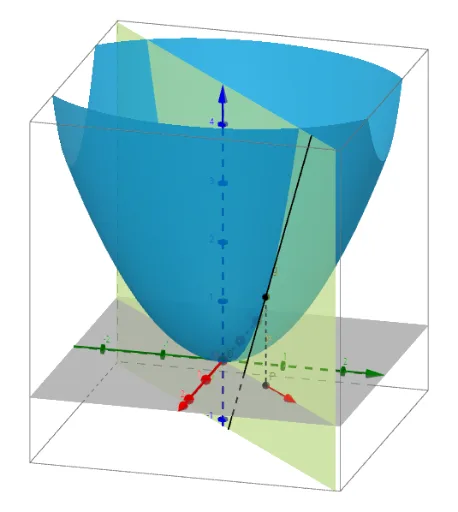
This example demonstrates the calculation and visualization of directional derivatives by dynamically adjusting direction vectors and function graphs, intuitively showing the geometric meaning of directional derivatives. Core math concepts include derivatives, vectors, planes, and tangent lines. Construction highlights involve commands like Textfield, Derivative, Segment, Vector, Plane, Line to draw function graphs, direction vectors, tangent planes, and tangent lines. Suitable for high school students and above, particularly for understanding the applications and properties of directional derivatives.
GeoGebra Commands & Parameters
Textfield(f) → InputBox1Derivative(f(x, y), x) → dfxDerivative(f(x, y), y) → dfySegment(P, XYP) → pSegment(XYP, (0, Y)) → jVector(O, A) → uPlane((a * (y - Y)) + (0 * z) = (b * (x - X))) → dVector(XYP, XYP + A) → vLine((x(P), y(P), z(P)), Vector[(cos(((Angle / 360 * 2) * π)), sin(((Angle / 360 * 2) * π)), parder)]) → g
AI Drawing Prompt Reference
Draw a function graph and display its gradient vectors and directional derivatives. Dynamically adjust the direction vector to show the geometric meaning of directional derivatives. Include the function's partial derivatives, direction vectors, tangent planes, and tangent lines to intuitively explain the concept of directional derivatives.
The prompt above was compiled from the original drawing commands and is for reference only.