
Dilation Transformation Demo by Jed Butler
Loading the math board and drawing, please wait…
In collections
Transformations Stations
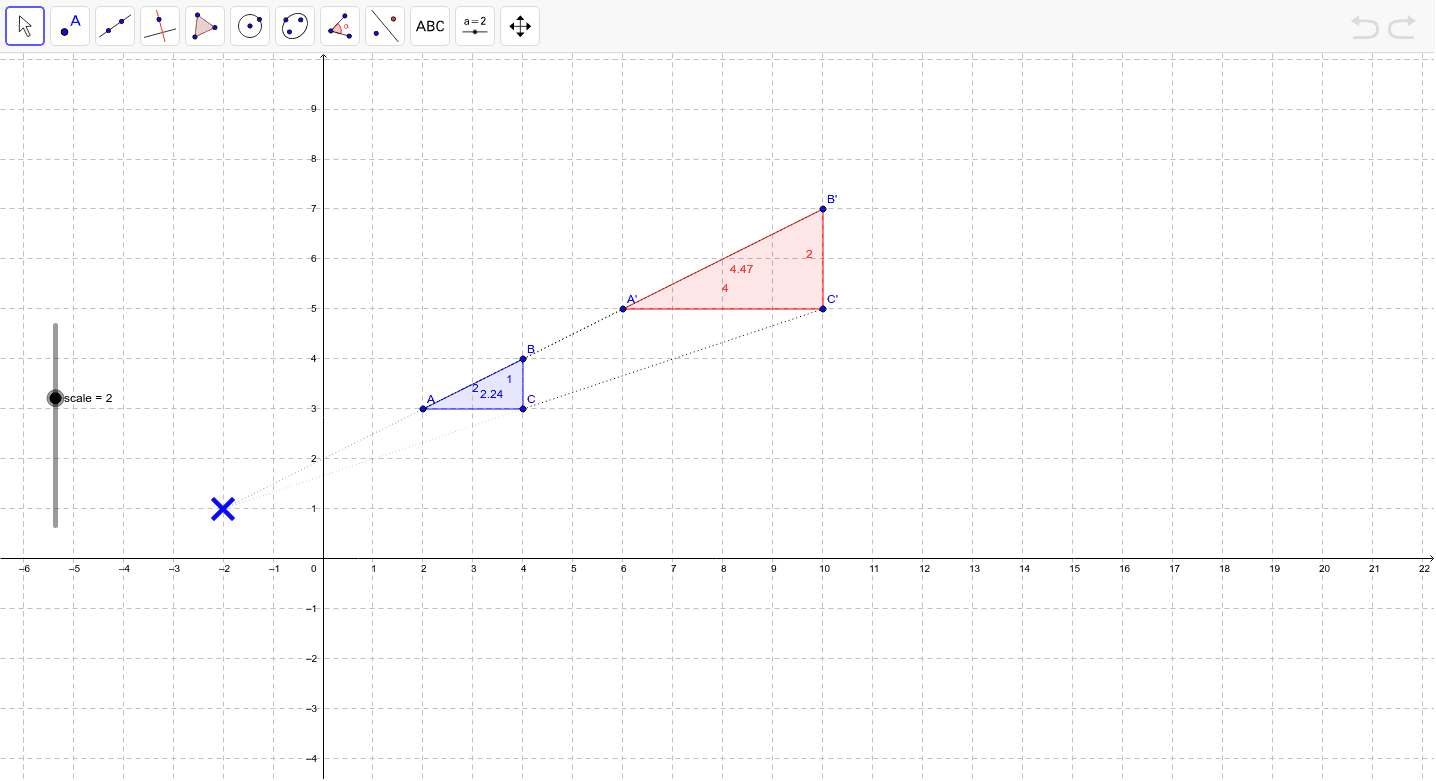
This example demonstrates how dilation changes the size and position of a figure. Key mathematical concepts include similarity transformations, proportional scaling, and geometric transformations. Construction involves GeoGebra commands like Polygon, Dilate, Segment, using objects A, B, C, poly1, c, a, b. Suitable for middle or high school mathematics to understand geometric transformations and proportional relationships.
GeoGebra Commands & Parameters
Polygon(A, B, C) → poly1, c, a, bDilate(A, scale, D) → A'Dilate(B, scale, D) → B'Dilate(C, scale, D) → C'Polygon(A', B', C') → poly1', c', a', b'Segment(B, B') → dSegment(A, A') → eSegment(C, C') → fSegment(D, B) → gSegment(D, C) → hSegment(D, A) → i
AI Drawing Prompt Reference
Draw a triangle and a point outside it as the center of dilation. Using a variable scale factor, create a second triangle that is an enlarged or reduced version of the first, with corresponding vertices connected by straight lines. Also draw line segments from the dilation center to each vertex of the original triangle. The figure should clearly illustrate the similarity transformation, showing that shape is preserved while size changes proportionally, and highlight the relationships among the center, original triangle, transformed triangle, and connecting segments.
The prompt above was compiled from the original drawing commands and is for reference only.