
Dilation of a Polygon: Interactive GeoGebra Demonstration
Loading the math board and drawing, please wait…
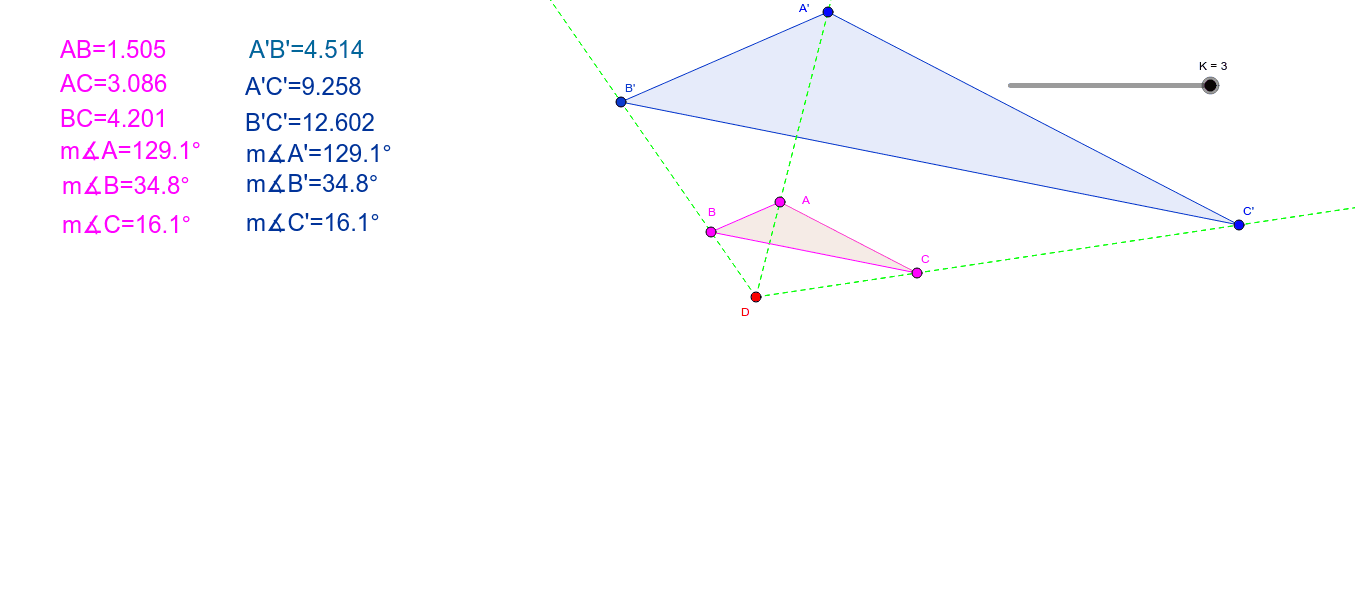
This GeoGebra example demonstrates the dilation (scaling) of a polygon (triangle) with respect to a center point, showing how the shape is enlarged or reduced while preserving its form. The core mathematical concept is dilation, a transformation that scales all distances from a fixed center by a constant factor, keeping angles and relative proportions unchanged. The construction uses the Polygon command to create the original triangle poly1, the Dilate command to generate the dilated triangle poly1' with center D and scale factor K, along with Ray and Segment commands to visualize the connecting lines. Distance and Angle measurements are included, with text objects displaying values such as distance AB and angles α, β, γ, allowing users to compare corresponding sides and angles before and after transformation. This resource is suitable for middle school (grades 8-9) or high school students learning geometric transformations, and can be used for classroom demonstrations or self-guided exploration of dilation properties.
GeoGebra Commands & Parameters
Polygon(A, B, C) → poly1, c, a, bDilate(A, K, D) → A'Dilate(B, K, D) → B'Dilate(C, K, D) → C'Polygon(A', B', C') → poly1', c', a', b'Ray(D, A) → fRay(D, B) → gRay(D, C) → hRay(D, A') → iRay(D, B') → jRay(D, C') → kDistance(A, B) → distanceABAngle(A, C, B) → αAngle(B, A, C) → βSegment(B, C) → lAngle(C, B, A) → γAngle(B', A', C') → δAngle(C', B', A') → εAngle(A', C', B') → ζ
AI Drawing Prompt Reference
Draw a triangle and its scaled version centered at a point. Show both the original and scaled triangles clearly, marking the center of dilation. Draw rays from the center to each vertex of the original triangle and to each vertex of the scaled triangle, using distinct colors. Measure and display the lengths of the three sides and the three interior angles of the original triangle, and do the same for the scaled triangle, with text labels. Include a slider to control the scale factor and display its value.
The prompt above was compiled from the original drawing commands and is for reference only.