
Dilation: Introducing the Terms
Loading the math board and drawing, please wait…
In collections
Dilation and Similarity Project: Part One
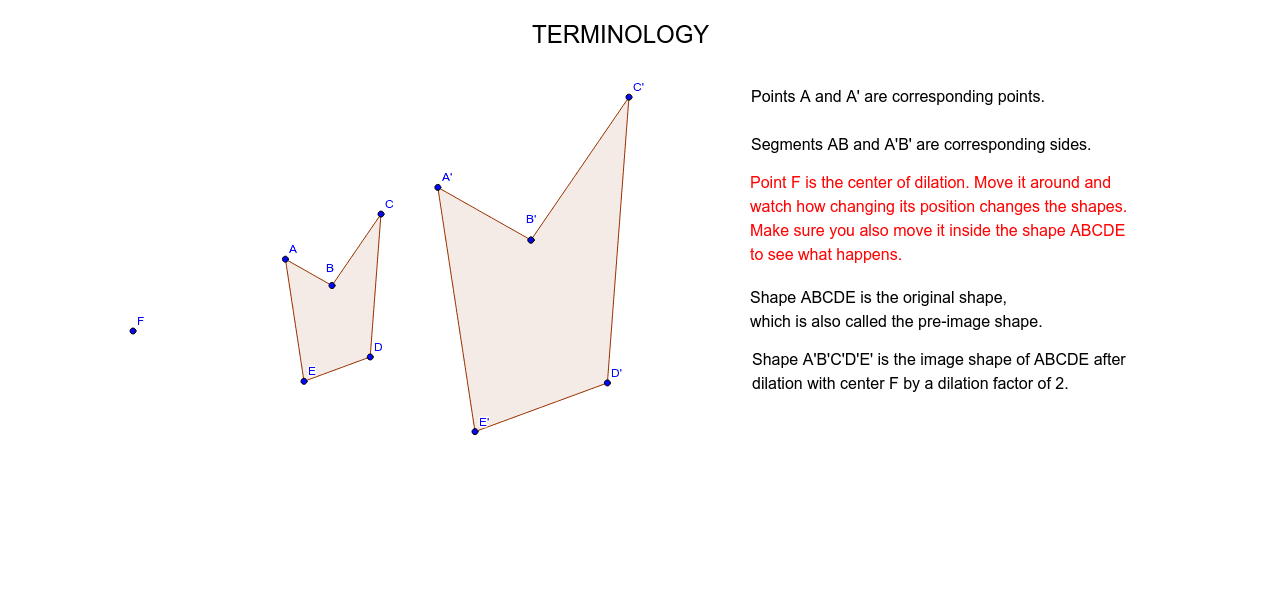
① This example demonstrates the basic terminology and visual effect of a dilation transformation by showing a polygon and its dilated image. ② The core mathematical concept is homothety (dilation), involving the center of dilation, scale factor, corresponding points and sides, and the similarity between the original and transformed figures. ③ Construction highlights: the Polygon command creates the original polygon, and the Dilate command generates the dilated polygon with a specified center (e.g., point F) and scale factor; the object list includes original vertices A, B, C, D, E and their images A', B', C', D', E', along with text labels text1 through text5 for annotating terms. ④ Suitable for middle school to high school students learning geometric transformations, and useful for teachers to illustrate the definition, properties, and notation of dilation in class.
GeoGebra Commands & Parameters
Polygon(A, B, C, D, E) → poly1, a, b, c, d, eDilate(B, 2, F) → B'Dilate(A, 2, F) → A'Dilate(B, 2, F) → B'_1Dilate(C, 2, F) → C'Dilate(D, 2, F) → D'Dilate(E, 2, F) → E'Polygon(A', B'_1, C', D', E') → poly1', a', b'_1, c', d', e'
AI Drawing Prompt Reference
Draw a pentagon, then dilate each vertex of the pentagon from a point by a consistent scale to create a larger pentagon, labeling the center of dilation, the original and dilated pentagons, and their corresponding vertices and sides to illustrate similarity.
The prompt above was compiled from the original drawing commands and is for reference only.