
Dynamic Proof of the Pythagorean Theorem
Loading the math board and drawing, please wait…
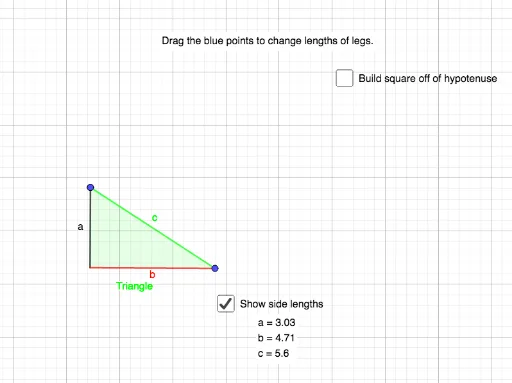
This example demonstrates the Pythagorean Theorem through dynamic geometry. It involves the relationship between the sides of a right triangle. Using GeoGebra commands such as Segment, OrthogonalLine, Point, etc., it provides an intuitive proof. Suitable for middle school and above students to learn geometric proofs.
GeoGebra Commands & Parameters
Segment(A, B) → fOrthogonalLine(A, f) → gPoint(g) → CPolygon(C, A, B) → t1, a, b, cCircle(B, a) → dLine(A, B) → hIntersect(d, h, 2) → DCircle(D, b) → eOrthogonalLine(D, h) → iIntersect(e, i, 2) → ECircle(E, a) → kIntersect(k, i, 2) → FOrthogonalLine(F, i) → jOrthogonalLine(A, h) → lIntersect(j, l) → GPolygon(G, A, D, F) → q1, g_1, a_1, d_1, f_1Centroid(q1) → HRotate(C, 270°, H) → C'Rotate(A, 270°, H) → A'Rotate(B, 270°, H) → B'Polygon(C', A', B') → t1', b', c', a'Rotate(C, 90°, H) → C'_1Rotate(A, 90°, H) → A'_1Rotate(B, 90°, H) → B'_1Polygon(C'_1, A'_1, B'_1) → t1'_1, b'_1, c'_1, a'_1Rotate(C, 180°, H) → C'_2Rotate(A, 180°, H) → A'_2Rotate(B, 180°, H) → B'_2Polygon(C'_2, A'_2, B'_2) → t1'_2, b'_2, c'_2, a'_2Rotate(C'_2, (-(90°)), C') → IRotate(A'_2, (-(90°)), C') → JRotate(B'_2, (-(90°)), C') → KPolygon(I, J, K) → t2, k_1, i_1, j_1Rotate(C'_1, 90°, B) → LRotate(A'_1, 90°, B) → MRotate(B'_1, 90°, B) → NPolygon(L, M, N) → t3, n, l_1, mCircle(A'_2, c'_1) → qIntersect(q, c'_1, 1) → OPolygon(C', J, O, A'_2) → q2, c'_3, j_2, o_1, a'_3Polygon(M, B, A'_1, O) → q3, m_1, b_1, a'_4, o_2
AI Drawing Prompt Reference
Draw a right triangle to dynamically demonstrate the Pythagorean theorem. Start by drawing the legs, then create a line perpendicular to one leg, forming a new point at the intersection. Construct multiple polygons and circles using these points to show area relationships. Rotate and reflect the shapes to observe how they overlap, providing an intuitive proof of the theorem.
The prompt above was compiled from the original drawing commands and is for reference only.