
Plane Fall Example
Loading the math board and drawing, please wait…
In collections
El dominio del Tiempo (cinemática intuitiva)
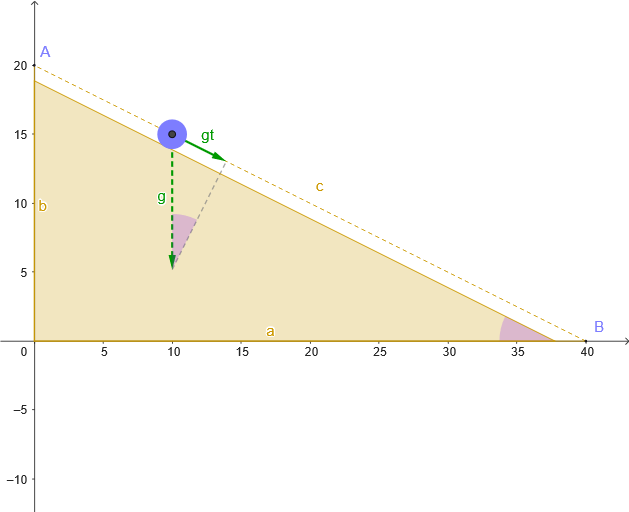
This example demonstrates the motion trajectory and geometric relationships of 2D vectors on a plane. It involves core mathematical concepts such as 2D vectors, geometric constructions, similar triangles, quadratic equations, plane characteristics, and statistical features. The construction highlights commands like Point, Polygon, Segment, UnitVector, Angle, and Circle from GeoGebra. Suitable for high school mathematics teaching, focusing on vector and geometry integration.
GeoGebra Commands & Parameters
Point(Ray[(0, 0), (1, 0)]) → BPoint(Ray[(0, 0), (0, 1)]) → APolygon((0, 0), B, A) → tri, a_{1}, c_{1}, b_{1}Segment(B, A) → cPoint(c) → MUnitVector(c_{1}) → nSegment(M + g, M + gt) → sAngle(M + gt, M + g, M) → βCircle(M, rb) → dPolygon((0, 0), B', A') → tri', a, c', bAngle(A', B', (0, 0)) → α
AI Drawing Prompt Reference
Draw a right triangle in a plane coordinate system with the vertex at the origin (0,0), point B on the x-axis, and point A on the y-axis. Connect the origin to points B and A to form a triangle. Take a point M on the x-axis and construct a unit vector n. Draw a line segment s from point M in the direction of vector n. Measure the angle β between line segment s and vector n. Draw a circle with center M and radius rb. Construct a similar triangle tri' to the original triangle, with point B' on the x-axis and point A' on the y-axis, connecting the origin to B' and A'. Measure angle α.
The prompt above was compiled from the original drawing commands and is for reference only.