
Geometric construction of the centroid for a uniform 2D body
Loading the math board and drawing, please wait…
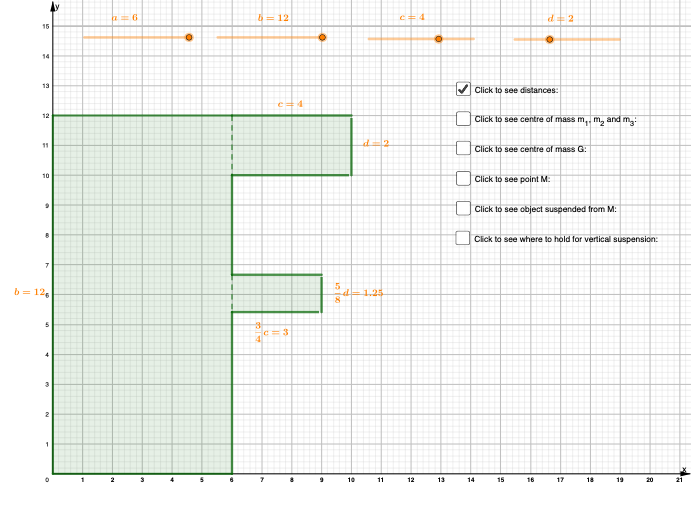
This example demonstrates how to locate the center of mass (centroid) of a uniform 2D planar body in GeoGebra and visualize the resulting centroid coordinates. The key mathematics includes the centroid of a planar region under uniform density, the idea of computing x̄ and ȳ using area-weighted averages, and a practical construction approach via partitioning the region into simpler pieces (commonly triangles). The construction relies on GeoGebra commands such as Intersect, Midpoint, Point, Ray, Segment, Polygon, Angle, Rotate, and Vector to build the geometric framework (vertices and auxiliary points), including points like A, B, C, D, E and multiple midpoints/fiducial points (e.g., m_1…m_6 and corresponding x_i, y_i). It then aggregates contributions using sumx, sumy and produces xbar, ybar, yielding the centroid point G. Suitable for advanced secondary school through first-year university, especially for geometry/coordinate geometry instruction and introductory engineering-mechanics teaching of centroids.
GeoGebra Commands & Parameters
Intersect(xAxis, yAxis) → OMidpoint(D, E) → m_5Midpoint(O, M) → m_4Midpoint(H, I) → m_6Ray(M, G) → t_1Point(t_1) → BPolygon(O, A, M, C) → q1, o, a_1, b_1, c_1Polygon(D, F, E, M) → q2, d_1, f, e_1, b_2Polygon(H, J, I, G_1) → q3, h, j, i, g_1Midpoint(O, A) → KMidpoint(O, C) → LMidpoint(M, E) → N_1Midpoint(E, F) → P_1Midpoint(H, J) → QMidpoint(I, J) → RPolygon(O, A, H, J, I, G_1, D, F, E, C) → poly1, o_1, c_2, a_2, h_1, j_1, i_1, m, d_2, f_1, e_2Angle(G, M, P) → αRotate(O, α, M) → O'Rotate(A, α, M) → A'Rotate(H, α, M) → H'Rotate(J, α, M) → J'Rotate(I, α, M) → I'Rotate(G_1, α, M) → TRotate(D, α, M) → D'Rotate(F, α, M) → F'Rotate(E, α, M) → E'Rotate(C, α, M) → C'Polygon(O', A', H', J', I', T, D', F', E', C') → poly1', o', c', a', h', j', i', t, d', f', e'Rotate(G, α, M) → G'Vector(M, B) → uRotate(u, α, M) → u'Segment(G, P) → nAngle(M, P, G) → βAngle(E, M, E') → γVector(N, S) → vSegment(D, G_1) → r_1Segment(H, A) → s_1Rotate(O, (-α), M) → O'_1Rotate(A, (-α), M) → A'_1Rotate(H, (-α), M) → H'_1Rotate(J, (-α), M) → J'_1Rotate(I, (-α), M) → I'_1Rotate(G_1, (-α), M) → VRotate(D, (-α), M) → D'_1Rotate(F, (-α), M) → F'_1Rotate(E, (-α), M) → E'_1Rotate(C, (-α), M) → C'_1Polygon(O'_1, A'_1, H'_1, J'_1, I'_1, V, D'_1, F'_1, E'_1, C'_1) → poly1'_1, o'_1, c'_1, a'_1, h'_1, j'_1, i'_1, v_1, d'_1, f'_1, e'_1Rotate(G, (-α), M) → G'_1Rotate(u, (-α), M) → u'_1Angle(E, M, E'_1) → δ
AI Drawing Prompt Reference
Draw a geometric construction to demonstrate the centroid of a uniform 2D planar body. Start by plotting the intersection of coordinate axes, then create multiple triangles within the body. Calculate the centroid of each triangle and connect them to form a new shape. Use rotations and vector operations to visualize the coordinate calculations, ultimately locating the centroid of the entire body.
The prompt above was compiled from the original drawing commands and is for reference only.