
Defining a Parabola in Standard Form
Loading the math board and drawing, please wait…
In collections
Exploring Conic Sections
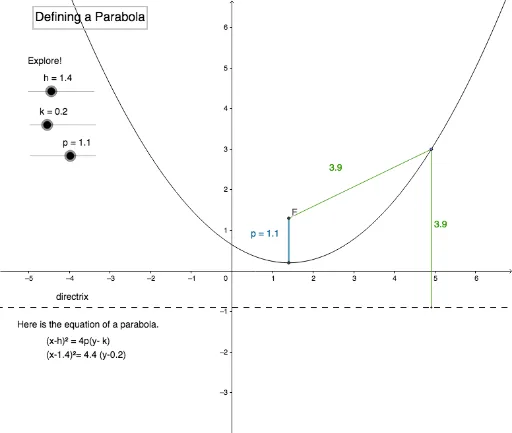
This example demonstrates how to graph a parabola using its standard form equation and explore its geometric properties. Key math concepts include the standard equation of a parabola, coordinate geometry, and special points like the vertex, focus, and axis of symmetry. GeoGebra commands used in construction are Intersect, Tangent, Line, Point, Segment, and OrthogonalLine to build the parabola and related elements. Suitable for high school students and educational purposes needing a deep understanding of parabola characteristics.
GeoGebra Commands & Parameters
Intersect(xAxis, yAxis) → ATangent(C, c) → b,Line(H, xAxis) → fPoint(c) → ESegment(E, F) → iOrthogonalLine(E, f) → jIntersect(f, j) → GSegment(E, G) → k_1Segment(F, C) → l
AI Drawing Prompt Reference
Draw a parabola showing its standard form equation, highlighting the vertex, focus, and axis of symmetry. Start by plotting the intersection of the x and y axes, then draw a tangent line from the intersection point. Next, draw a line parallel to the x-axis through the tangent point. Choose an arbitrary point on the tangent line, connect it to the parallel line, and draw a perpendicular line from the point to the parallel line. The intersection of the perpendicular line and the parallel line is a point on the parabola. Connect this point to the tangent point and the intersection point of the axes to form the parabola and its key geometric elements.
The prompt above was compiled from the original drawing commands and is for reference only.