
Dilation Example
Loading the math board and drawing, please wait…
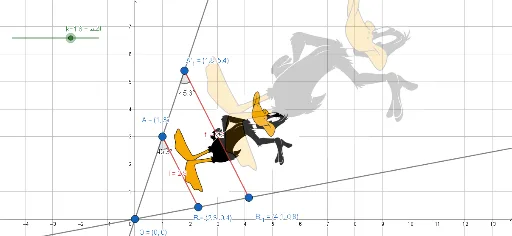
This example demonstrates the effect of a geometric figure undergoing a dilation transformation. It involves core math concepts like dilation, scale factor, center of transformation, and vectors. Constructed using commands such as Rotate, Segment, Dilate, Line, and Angle in GeoGebra, it is suitable for high school students learning geometric transformations.
GeoGebra Commands & Parameters
Rotate(pic1, n, O) → pic1'Rotate(A, n, O) → A'Rotate(B, n, O) → B'Segment(A, B) → fDilate(pic1, k, O) → pic1'_1Dilate(A, k, O) → A'_1Dilate(B, k, O) → B'_1Segment(A'_1, B'_1) → f'Line(A'_1, A) → gLine(O, B) → hAngle(A, A'_1, B'_1) → αAngle(O, A, B) → β
AI Drawing Prompt Reference
Draw a geometric figure demonstrating a dilation transformation, including a center point, two initial points, their rotated versions, and the corresponding points after dilation. Connect the initial points and their dilated counterparts with line segments. Also, draw lines connecting the original and dilated points to the center, and label the two angles to illustrate the effect of the dilation transformation.
The prompt above was compiled from the original drawing commands and is for reference only.