
Dilation and Reflection (Degrees)
Loading the math board and drawing, please wait…
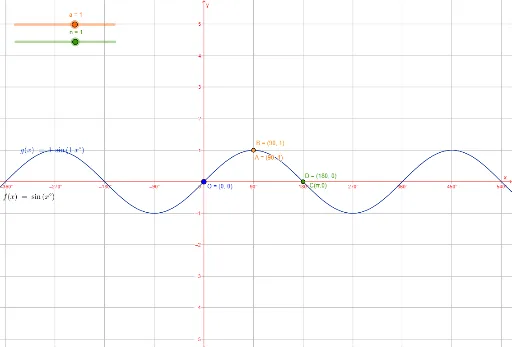
This GeoGebra example demonstrates a composite transformation involving dilation (scaling) and reflection controlled by an angle parameter in degrees. It visually shows how a geometric figure changes size and orientation under these transformations. Core mathematical concepts include similarity transformations, symmetry, composition of transformations, angle measurement, and the Pythagorean theorem as a potential underlying relation. The construction uses objects such as a, n, f, A, C, O, nTimes2, g, B, and D, likely including sliders for the dilation factor and angle, points defining the original shape, and commands to generate the reflected image. Suitable for middle school to high school students learning geometric transformations, this example helps explore how scaling and reflection affect coordinates, distances, and orientation, and can serve as an interactive teaching tool for classroom demonstrations.
GeoGebra Commands & Parameters
Numeric a(1)Numeric n(1)f(x) = sin(x°)(90, 1)(180, 0)(0, 0)(2 * n)g(x) = (a * sin(((n * x))°))(90 / n, a)(180 / n, 0)
AI Drawing Prompt Reference
Draw a coordinate plane with a sine curve whose amplitude is controlled by a slider and whose period is determined by an integer parameter. Mark three key points on the curve: one at the origin, one at the intersection with the positive x-axis, and one at the peak. Also draw a straight line through the origin as a reflection axis, with its direction set by an angle parameter. Show a transformed curve obtained by scaling and reflecting the original across this line, with size changed proportionally. Use distinct colors for the original curve, the transformed curve, and the auxiliary line, and include an angle label.
The prompt above was compiled from the original drawing commands and is for reference only.