
Dilate and Rotate: Generating a Series of Similar Triangles
Loading the math board and drawing, please wait…
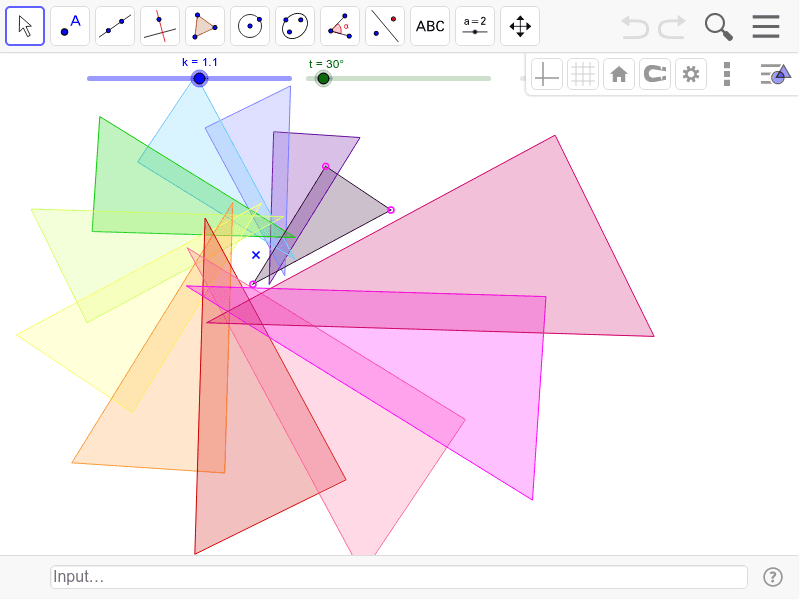
This GeoGebra example demonstrates how a series of similar triangles can be generated by applying dilation (scaling) and rotation transformations to an initial triangle. The core mathematical concepts involve similarity transformations, scale factors, rotation angles, and iterative sequences. The construction uses the Polygon command to create the base triangle and the Rotate command to rotate it, with parameters such as n controlling the number of iterations, producing triangles T0 through T11 in a spiral arrangement. This is ideal for middle or high school geometry classes to explore properties of similar triangles, composition of transformations, and parametric iteration.
GeoGebra Commands & Parameters
Polygon(B, C, D) → T0, d, b, cRotate(Polygon[Dilate[B, k, A], Dilate[C, k, A], Dilate[D, k, A]], t, A) → T1Rotate(Dilate[T1, k, A], t, A) → T2Rotate(Dilate[T2, k, A], t, A) → T3Rotate(Dilate[T3, k, A], t, A) → T4Rotate(Dilate[T4, k, A], t, A) → T5Rotate(Dilate[T5, k, A], t, A) → T6Rotate(Dilate[T6, k, A], t, A) → T7Rotate(Dilate[T7, k, A], t, A) → T8Rotate(Dilate[T8, k, A], t, A) → T9Rotate(Dilate[T9, k, A], t, A) → T10Rotate(Dilate[T10, k, A], t, A) → T11
AI Drawing Prompt Reference
Draw an initial triangle and generate a series of similar triangles by repeatedly applying scaling and rotation transformations. Each transformation uses the same scale factor and rotation angle to scale and rotate the previous triangle, creating a new triangle each time and forming a spiral arrangement of similar triangles.
The prompt above was compiled from the original drawing commands and is for reference only.