
Differential Equation Example
Loading the math board and drawing, please wait…
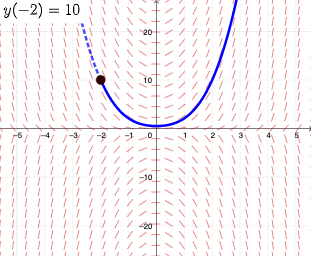
This example demonstrates how to use GeoGebra to draw the slope field and solution of a differential equation. Key mathematical concepts include differential equations, slope fields, and numerical integration. Using commands like SlopeField, SolveODE, and numericalIntegral, the solution of the differential equation can be constructed. Suitable for university-level calculus courses.
GeoGebra Commands & Parameters
SlopeField(f, 25, 0.8) → slopefield1SolveODE(f, x(A), y(A), 6, 0.005) → numericalIntegral1SolveODE(f, x(A), y(A), -6, 0.005) → numericalIntegral2
AI Drawing Prompt Reference
Draw a slope field and numerical solutions for a differential equation, where the slope field covers the range from -25 to 25 with a step size of 0.8, and two numerical solution curves are obtained by integrating from -6 to 6 with a step size of 0.005, both starting from the same initial point to show the evolution of the solutions over time.
The prompt above was compiled from the original drawing commands and is for reference only.