
Diagonals of a Parallelogram Demo
Loading the math board and drawing, please wait…
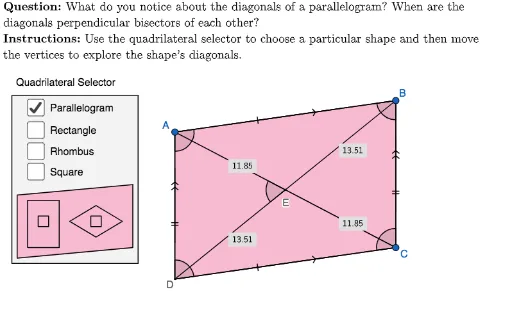
This example demonstrates the properties of diagonals in a parallelogram, focusing on the intersection point and the relationship between the segments formed. Key math concepts include parallelograms, diagonals, midpoints, angle bisectors, and vectors. GeoGebra commands and objects used in construction are Polygon, PointIn, Intersect, Mirror, Circle, Line, Segment, Midpoint, Angle, and AreParallel. Suitable for middle school and above mathematics education to visually understand geometric properties of parallelograms.
GeoGebra Commands & Parameters
Polygon({(-6, 19), (26, 19), (26, 0), (-6, 0)}) → viewBoxPointIn(viewBox) → paraAPointIn(viewBox) → paraBPointIn(viewBox) → recBPointIn(viewBox) → sqBPointIn(viewBox) → rhomBPointIn(viewBox) → recAPoint(OrthogonalLine[recB, Line[recA, recB]]) → recCIntersect(Line[recA, Line[recB, recC]], Line[recC, Line[recA, recB]]) → recDPointIn(viewBox) → sqAMirror(sqA, AngularBisector[Line[sqA, sqB], OrthogonalLine[sqB, Line[sqA, sqB]]]) → sqCIntersect(Line[sqA, Line[sqB, sqC]], Line[sqC, Line[sqA, sqB]]) → sqDPointIn(viewBox) → rhomACircle(rhomB, rhomA) → circle1forRhombusPoint(circle1forRhombus) → rhomCMirror(rhomB, Line[rhomA, rhomC]) → rhomDPointIn(viewBox) → paraCIf(showParallelogram, paraC, If[showRectangle, recC, If[showRhombus, rhomC, sqC]]) → CIf(showParallelogram, paraB, If[showRectangle, recB, If[showRhombus, rhomB, sqB]]) → BLine(B, C) → lineRightIf(showParallelogram, paraA, If[showRectangle, recA, If[showRhombus, rhomA, sqA]]) → ALine(A, B) → lineTopIntersect(Line[paraA, lineRight], Line[paraC, lineTop]) → paraDSegment(A, C) → ACPolygon({(-11.5, 9), (-9, 7.5), (-11.5, 6), (-14, 7.5)}) → selectorShapeRhombusPolygon({(-19, 10), (-8, 11), (-8, 5), (-19, 4)}) → selectorShapeParallelogramLaTeX((((("\text{" * QUESTION) * "\\") * INSTRUCTIONS) * "}")) → TEXTPolygon({(-19.5, 19.5), (-7.5, 19.5), (-7.5, 3.5), (-19.5, 3.5)}) → selectorBoxQuadrilateralPolygon({(-12, 8), (-12, 7), (-11, 7), (-11, 8)}) → selectorShapeSquare2Polygon({Vertex[selectorShapeRhombus]}) → selectorBorderRhombusPolygon({Vertex[selectorShapeParallelogram]}) → selectorBorderParallelogramPolygon({Vertex[selectorShapeSquare2]}) → selectorBorderSquare2If(showParallelogram, paraD, If[showRectangle, recD, If[showRhombus, rhomD, sqD]]) → DSegment(A, B) → ABSegment(A, D) → ADSegment(B, C) → BCSegment(D, B) → DBSegment(D, C) → DCMidpoint(AB) → midABMidpoint(AD) → midADMidpoint(BC) → midBCMidpoint(D, C) → midDCSegment(A, Midpoint[Segment[midAB, B]]) → AB_1Segment(Midpoint[Segment[midAB, A]], B) → AB_2Segment(Midpoint[Segment[midAD, D]], A) → AD_1Segment(Midpoint[Segment[midAD, A]], D) → AD_2Segment(Midpoint[Segment[midBC, C]], B) → BC_1Segment(Midpoint[Segment[midBC, B]], C) → BC_2Segment(D, Midpoint[Segment[midDC, C]]) → DC_1Segment(Midpoint[Segment[midDC, D]], C) → DC_2Polygon({A, B, C, D}) → quadrilateralIntersect(AC, DB) → EAngle(A, B, C) → ABCAngle(B, C, D) → BCDAngle(C, D, A) → CDAAngle(D, A, B) → DABLine(A, D) → lineLeftLine(D, C) → lineBottomAreParallel(lineLeft, lineRight) → parallelLeftRightAreParallel(lineTop, lineBottom) → parallelTopBottomLaTeX(UnicodeToLetter[10003]) → cmarkLaTeX(UnicodeToLetter[10007]) → xmarkLaTeX(Distance[A, E]) → labelAELaTeX(Distance[B, E]) → labelBELaTeX(Distance[C, E]) → labelCELaTeX(Distance[D, E]) → labelDEAngle(A, E, D) → AEDPolygon({(-18, 5), (-18, 9.5), (-15, 9.5), (-15, 5)}) → selectorShapeRectanglePolygon({Vertex[selectorShapeRectangle]}) → selectorBorderRectanglePolygon({(-17, 7), (-17, 8), (-16, 8), (-16, 7)}) → selectorShapeSquare1Polygon({Vertex[selectorShapeSquare1]}) → selectorBorderSquare1
AI Drawing Prompt Reference
Draw a parallelogram and its diagonals, then find their intersection point. Next, draw a rectangle and a rhombus, and find their diagonal intersection points. Finally, draw the diagonals of each shape and mark the midpoints of each diagonal.
The prompt above was compiled from the original drawing commands and is for reference only.