
DG Study Task 8
Loading the math board and drawing, please wait…
In collections
Dynamic Geometry Study Tasks
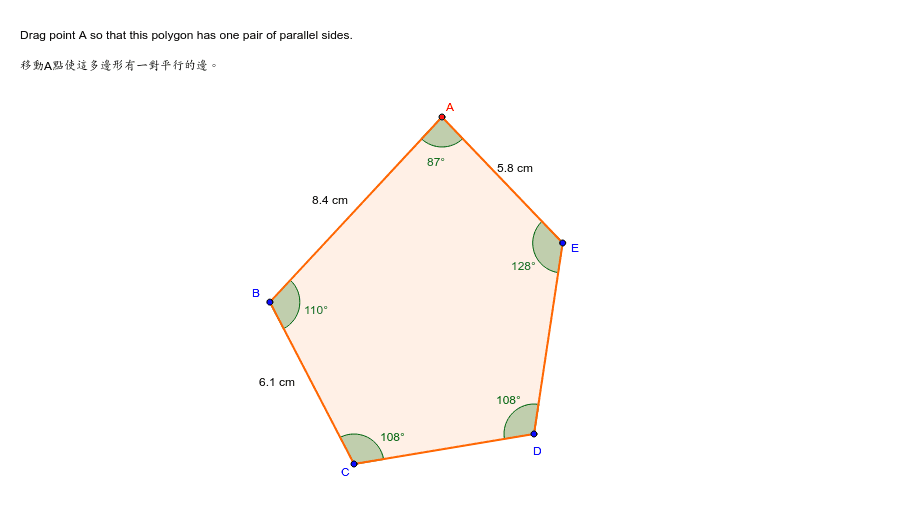
This example demonstrates concepts such as angles, volume, tangent function, median line, coordinates, and geometric mean. It constructs a complex geometric figure using commands like Rotate, Ray, Point, Polygon, Angle, Distance, Midpoint, etc. Suitable for high school mathematics education and learning.
GeoGebra Commands & Parameters
Rotate(C, 252*°, D) → GRay(D, G) → gRotate(D, 108*°, C) → FRay(C, F) → fPoint(f) → BPoint(g) → EPolygon(A, B, C, D, E) → P, a, b, c, d, eAngle(P) → α, β, γ, δ, εDistance(A, B) → var6Distance(A, E) → var7Midpoint(A, B) → HMidpoint(E, A) → IMidpoint(B, C) → J
AI Drawing Prompt Reference
Construct a pentagon ABCDE with points A, B, C, D, and E defined through rotations and rays. Start by rotating point C 252 degrees counterclockwise around point D to get point G, then draw ray g from point D. Next, rotate point D 108 degrees clockwise around point C to get point F, and draw ray f from point C. Take point B on ray f and point E on ray g. Connect points A, B, C, D, and E to form pentagon P and label its five interior angles α, β, γ, δ, ε. Measure the lengths of AB and AE to get var6 and var7, respectively. Finally, find the midpoints H, I, and J of AB, AE, and BC, respectively.
The prompt above was compiled from the original drawing commands and is for reference only.