
Derivative of a Function by Juan Carlos Ponce Campuzano
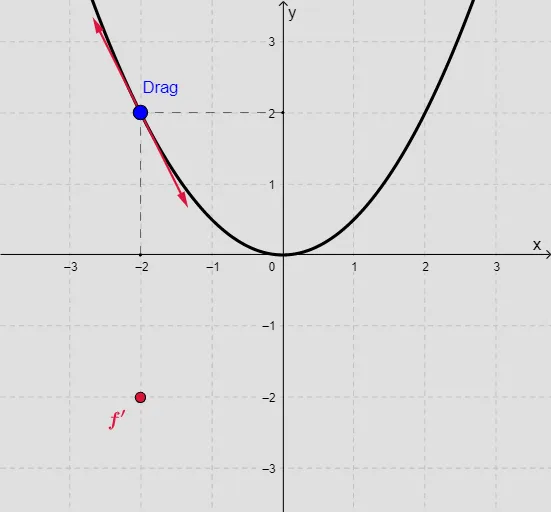
Loading the math board and drawing, please wait…
This example demonstrates how to use GeoGebra to draw the derivative of a function. Key mathematical concepts include derivatives and tangents. Commands used include Point, Circle, Tangent, Intersect, Vector, Derivative, Slope, Textfield, Segment, If, Line. Suitable for high school math education and learning calculus concepts.
GeoGebra Commands & Parameters
Point(f) → ACircle(A, 1.5) → cTangent(A, f) → g1Intersect(c, g1) → B, CVector(A, B) → uVector(A, C) → vDerivative(f) → f'Slope(g1) → a1Textfield(d1) → InputBox3Segment(G, E) → hSegment(F, E) → iTextfield(df1) → InputBox2If(df1 ≟ df1, 1, 0) → validTextfield(inputuser1) → InputBox4If(f ≟ f, 1, 0) → valid2Textfield(inputuser2) → InputBox5Line(H, xAxis) → gLine(I, xAxis) → j
AI Drawing Prompt Reference
Draw a function and its derivative, showing the function curve, then take a point on the curve, draw a circle centered at this point, find the intersections of the tangent line at this point with the circle, draw vectors through these intersection points, calculate and plot the derivative of the function, and label the slope of the tangent line, demonstrating the function, tangent, derivative, and geometric construction process.
The prompt above was compiled from the original drawing commands and is for reference only.