
Derivative Maximum Problem Part 1
Loading the math board and drawing, please wait…
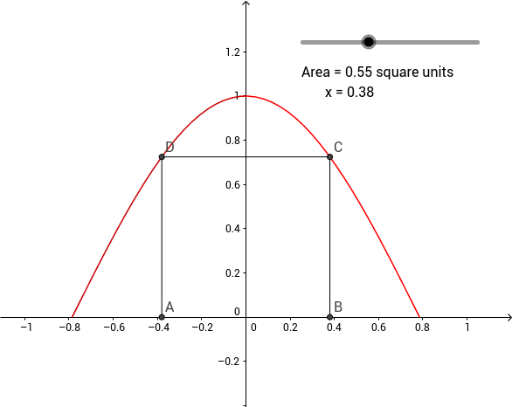
This example demonstrates how to construct and analyze the maximum value of a derivative for a given function using GeoGebra. Key math concepts include derivatives, function extrema, and analytical geometry. Construction highlights involve commands like Intersect and Segment to build critical points, vectors, and auxiliary shapes. Suitable for high school students and educators for learning and teaching demonstrations.
GeoGebra Commands & Parameters
Intersect(i, xAxis) → AIntersect(g, h, (0.38, 0.7248360107409052)) → CIntersect(f, i, (-0.38, 0.7248360107409052)) → DSegment(D, A) → kSegment(D, C) → jIntersect(h, xAxis) → BSegment(C, B) → m
AI Drawing Prompt Reference
Draw a function and its derivative, highlight the maximum point of the derivative, connect this point to the intersection of the derivative with the x-axis, connect this point to the intersection of the derivative with the x-axis, and finally connect the intersection of the derivative with the x-axis to another intersection on the x-axis, showing the extrema of the derivative and auxiliary segments.
The prompt above was compiled from the original drawing commands and is for reference only.