
Derivative Demonstration by Ku, Yin Bon (Albert)
Loading the math board and drawing, please wait…
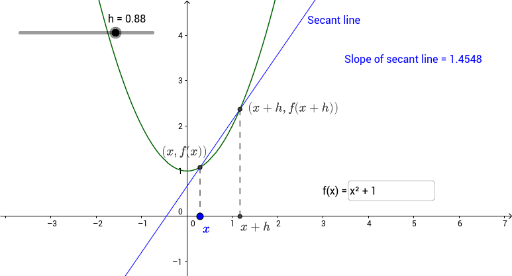
This example demonstrates the concept of derivatives by dynamically drawing tangents to show the geometric meaning of derivatives. It involves core math concepts like derivatives, exponential functions, quadratic functions, intersections, and standard deviation. The construction uses GeoGebra commands and objects such as Point, Textfield, Line, Tangent, Segment, and Slope. Suitable for high school mathematics teaching and introductory calculus learners.
GeoGebra Commands & Parameters
Point(xAxis) → ATextfield(f) → InputBox1Line(C, B) → gTangent(x(A), f) → iSegment(B, A) → jSegment(C, D) → kSlope(g) → mSlope(i) → t
AI Drawing Prompt Reference
Create a dynamic diagram illustrating the geometric meaning of derivatives. Draw a smooth curve representing a differentiable function on a coordinate plane. Place a movable point on the curve and mark its projection on the x-axis. Construct the tangent line to the curve at the movable point, and draw a vertical segment connecting the point to its projection. Additionally, fix another point on the curve and connect it to a reference point to form a line for comparison. Display the numerical slope of the tangent and the slope of the comparison line, showing dynamically that the derivative equals the tangent slope.
The prompt above was compiled from the original drawing commands and is for reference only.