
Derivative Builder
Loading the math board and drawing, please wait…
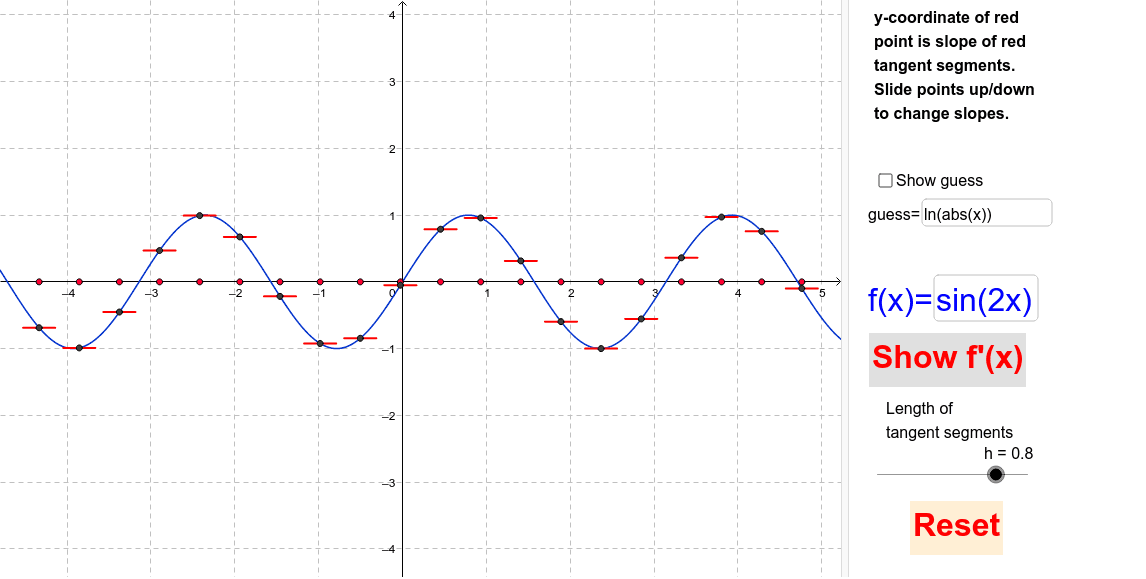
This example demonstrates how to visualize the concept of derivatives dynamically by constructing points, segments, and text fields. Core math concepts include derivatives, coordinate geometry, arithmetic operations, and scalene triangles. Construction highlights from the summary involve commands like Corner, Point, If, Segment, and Textfield. Suitable for high school and above students to learn and understand the calculation and geometric meaning of derivatives in calculus.
GeoGebra Commands & Parameters
Corner(3) → c3Corner(1) → c1Point(x = B2) → C2Point(x = B3) → C3Point(x = B4) → C4Point(x = B5) → C5Point(x = B6) → C6Point(x = B7) → C7Point(x = B8) → C8Point(x = B9) → C9Point(x = B10) → C10Point(x = B11) → C11Point(x = B12) → C12Point(x = B13) → C13Point(x = B14) → C14Point(x = B15) → C15Point(x = B16) → C16Point(x = B17) → C17Point(x = B18) → C18Point(x = B19) → C19Point(x = B20) → C20If(togfp ≟ 0, "Show f'(x)", "Hide f'(x)") → ShowHidefprimeSegment(D2 + ((h * delx / 2) * (1, y(C2))), D2 - ((h * delx / 2) * (1, y(C2)))) → E2Segment(D3 + ((h * delx / 2) * (1, y(C3))), D3 - ((h * delx / 2) * (1, y(C3)))) → E3Textfield(f) → InputfOFxSegment(D4 + ((h * delx / 2) * (1, y(C4))), D4 - ((h * delx / 2) * (1, y(C4)))) → E4Segment(D5 + ((h * delx / 2) * (1, y(C5))), D5 - ((h * delx / 2) * (1, y(C5)))) → E5Segment(D6 + ((h * delx / 2) * (1, y(C6))), D6 - ((h * delx / 2) * (1, y(C6)))) → E6Segment(D7 + ((h * delx / 2) * (1, y(C7))), D7 - ((h * delx / 2) * (1, y(C7)))) → E7Segment(D8 + ((h * delx / 2) * (1, y(C8))), D8 - ((h * delx / 2) * (1, y(C8)))) → E8Segment(D9 + ((h * delx / 2) * (1, y(C9))), D9 - ((h * delx / 2) * (1, y(C9)))) → E9Segment(D10 + ((h * delx / 2) * (1, y(C10))), D10 - ((h * delx / 2) * (1, y(C10)))) → E10Segment(D11 + ((h * delx / 2) * (1, y(C11))), D11 - ((h * delx / 2) * (1, y(C11)))) → E11Segment(D12 + ((h * delx / 2) * (1, y(C12))), D12 - ((h * delx / 2) * (1, y(C12)))) → E12Segment(D13 + ((h * delx / 2) * (1, y(C13))), D13 - ((h * delx / 2) * (1, y(C13)))) → E13Segment(D14 + ((h * delx / 2) * (1, y(C14))), D14 - ((h * delx / 2) * (1, y(C14)))) → E14Segment(D15 + ((h * delx / 2) * (1, y(C15))), D15 - ((h * delx / 2) * (1, y(C15)))) → E15Segment(D16 + ((h * delx / 2) * (1, y(C16))), D16 - ((h * delx / 2) * (1, y(C16)))) → E16Segment(D17 + ((h * delx / 2) * (1, y(C17))), D17 - ((h * delx / 2) * (1, y(C17)))) → E17Segment(D18 + ((h * delx / 2) * (1, y(C18))), D18 - ((h * delx / 2) * (1, y(C18)))) → E18Segment(D19 + ((h * delx / 2) * (1, y(C19))), D19 - ((h * delx / 2) * (1, y(C19)))) → E19Segment(D20 + ((h * delx / 2) * (1, y(C20))), D20 - ((h * delx / 2) * (1, y(C20)))) → E20Point(x = B1) → C1Segment(D1 + ((h * delx / 2) * (1, y(C1))), D1 - ((h * delx / 2) * (1, y(C1)))) → E1Textfield(g) → InputGuess
AI Drawing Prompt Reference
Create a dynamic derivative visualization: place an editable function input field and a guess input field on the coordinate plane, along with a toggle button to show or hide the derivative curve. Sample a series of equally spaced points along the function curve, and from each point draw a short horizontal segment whose length is controlled by a parameter, representing the differential increment at that point. Also include corner reference points for orientation. The layout should clearly display the function curve, sampled points, and their corresponding horizontal tangent segments to illustrate how the derivative changes with position.
The prompt above was compiled from the original drawing commands and is for reference only.