
Derivative and Trapezoid Area Relationship
Loading the math board and drawing, please wait…
In collections
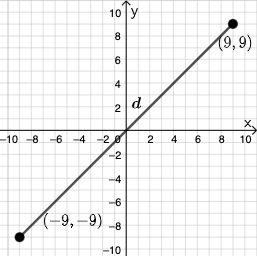
Open Middle: Distance in the Coordinate Plane (3)
This example demonstrates the relationship between the area of a trapezoid formed by two points on a function's graph and its derivative; Core math concepts include derivatives, trapezoidal area, continuity, and plane geometry; Construction highlights the use of GeoGebra commands/objects like PointIn, Segment, SurdText, Textfield, Point, If, Mode, Intersect, Polygon, Angle; Suitable for high school and above students to understand the geometric meaning of derivatives in calculus and area calculation.
GeoGebra Commands & Parameters
PointIn(e) → APointIn(e) → BSegment(A, B) → fSurdText(f) → text1Textfield(j) → InputBox1Textfield(k) → InputBox2Point(Circle[A, sqrt((100 * j) + (10 * k) + o)]) → CSegment(A, C) → lIf(m < i, "Too short!", m > i, "Too long!", "This value is correct!") → text7Mode(l1) → l2Intersect(eq1, p) → DPolygon(A, D, B) → t1, b_1, a_1, d_1Segment(A, D) → qSegment(D, B) → rAngle(B, D, A) → αTextfield(o) → InputBox3If(Length[l2] ≟ 0, "AV's of all digits are different.", "AV's of some digits repeat.") → text8
AI Drawing Prompt Reference
Draw a function graph and select two points A and B on it to form a segment f. Calculate the length of f and display it. Input two numbers j and k to find point C on a specific circle using j and k as parameters, then form segment l by connecting AC. Check if the length of l meets the requirement and display the result. Find point D on the function graph and form trapezoid t1 by connecting AD and DB. Calculate the angle BAD and display it.
The prompt above was compiled from the original drawing commands and is for reference only.