
Demonstration of Roots of Unity
Loading the math board and drawing, please wait…
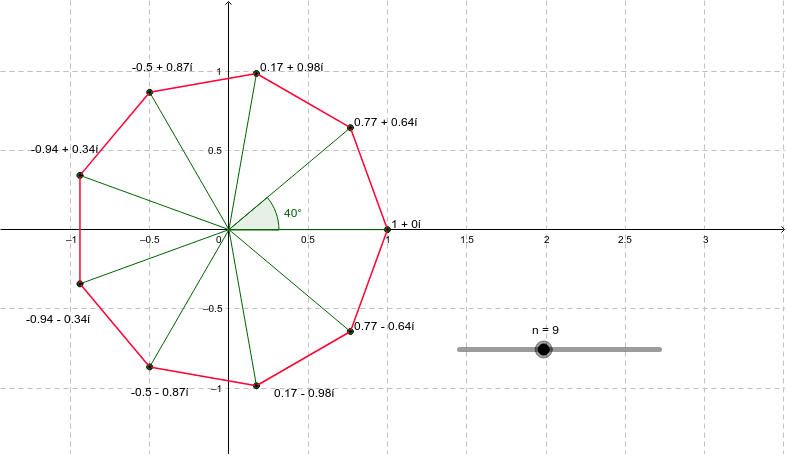
This example demonstrates the distribution of nth roots of unity on the complex plane. It involves core mathematical concepts such as complex numbers, trigonometry, sequences, and geometric constructions. The construction uses GeoGebra commands like Sequence, Segment, Angle, and Element. It is suitable for high school students to visually understand the properties and distribution of roots of unity.
GeoGebra Commands & Parameters
Sequence(cos(((2 * k) * π / n)) + (ί * sin(((2 * k) * π / n))), k, 0, n - 1) → list1Sequence(Segment[Element[list1, k], Element[list1, k + 1]], k, 1, n - 1) → list2Segment(Element[list1, n], Element[list1, 1]) → aSequence(Segment[(0, 0), Element[list1, j]], j, 1, n) → list3Angle(Element[list3, 1], Element[list3, 2]) → αElement(list1, A1) → B1Element(list1, A2) → B2Element(list1, A3) → B3Element(list1, A4) → B4Element(list1, A5) → B5Element(list1, A6) → B6Element(list1, A7) → B7Element(list1, A8) → B8Element(list1, A9) → B9Element(list1, A10) → B10Element(list1, A11) → B11Element(list1, A12) → B12Element(list1, A13) → B13Element(list1, A14) → B14Element(list1, A15) → B15Element(list1, A16) → B16Element(list1, A17) → B17Element(list1, A18) → B18Element(list1, A19) → B19Element(list1, A20) → B20
AI Drawing Prompt Reference
Draw the distribution of the nth roots of unity on the complex plane by first generating n points using cosine and sine functions, then connecting these points in order to form a closed polygon. Next, draw line segments from the origin to each vertex and label the angle between the first and second line segments. Finally, mark specific points on the polygon.
The prompt above was compiled from the original drawing commands and is for reference only.