
Demonstration of Quadrilateral Area Change
Loading the math board and drawing, please wait…
In collections
CCSS High School: Geometry (Congruence) Volume 2
CCSS High School: Geometry (Congruence) Volume 2
CCSS High School: Geometry (Congruence) Volume 2
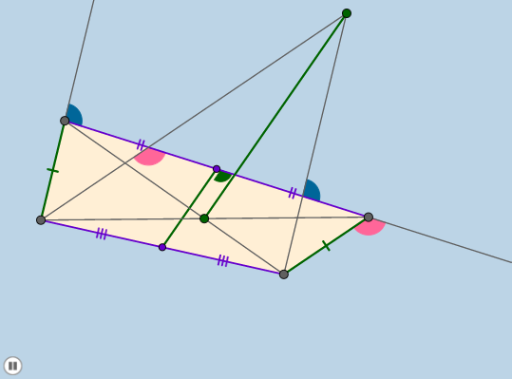
This example demonstrates the change in the area of a quadrilateral. Key mathematical concepts include quadrilaterals, area calculation, and logic. Using GeoGebra commands such as Segment, Circle, Line, Intersect, etc., a dynamic quadrilateral model is constructed. Suitable for middle school and above students to learn geometric transformations and area calculation.
GeoGebra Commands & Parameters
Segment(A, D) → fCircle(C, f) → eLine(C, D) → mIntersect(e, m) → H, ICircleArc(C, I, H) → pPoint(p) → BLine(D, B) → g_1Segment(B, D) → nDilate(A, If[0 < a ≤ 1, 1 - a, 0], D) → A'Segment(A, A') → sLine(C, s) → cSegment(D, C) → gMidpoint(g) → NSegment(C, B) → hSegment(B, A) → iMidpoint(i) → MSegment(N, M) → jSegment(A, C) → kIntersect(k, n) → LLine(B, f) → lLine(A, h) → qIntersect(l, q) → KSegment(L, K) → rSlope(j) → m_1Slope(r) → m_2Dilate(D, If[1 < a ≤ 2, 2 - a, 0], N) → B'Segment(D, B') → tDilate(N, If[2 < a ≤ 3, 3 - a, 0], C) → F'Segment(N, F') → bRotate(D, If[3 < a ≤ 4, ((a - 3) * π), π], N) → B'_1Rotate(B', If[3 < a ≤ 4, ((a - 3) * π), π], N) → B''Intersect(g_1, c) → M_1Angle(M_1, C, B) → αSegment(B'_1, B'') → t'Dilate(D, If[4 < a ≤ 5, 5 - a, 0], C) → B'_2Vector(D, B'_2) → uTranslate(A, u) → A'_1Translate(A', u) → A''Segment(A'_1, A'') → s'Rotate(A'_1, If[5 < a ≤ 6, ((a - 5) * α), α], C) → K_1Rotate(A'', If[5 < a ≤ 6, ((a - 5) * α), α], C) → A'''Segment(K_1, A''') → s''Dilate(A, If[6 < a ≤ 7, 7 - a, 0], M) → A'_2Segment(A, A'_2) → dDilate(M, If[7 < a ≤ 8, 8 - a, 0], B) → E'Segment(M, E') → f_1Rotate(A, If[8 < a ≤ 9, ((a - 8) * π), π], M) → A'_3Rotate(A'_2, If[8 < a ≤ 9, ((a - 8) * π), π], M) → L_1Segment(A'_3, L_1) → d'Polygon(A, D, C, B) → poly1, a_1, b_1, c_1, d_1Dilate(N, If[9 < a ≤ 10, 10 - a, 0], M) → F'_1Segment(N, F'_1) → h_1Circle(C, 5) → e_1Intersect(e_1, m, 1) → N_1Ray(C, N_1) → i_1Intersect(m, q) → OSegment(D, O) → j_1Segment(O, N) → k_1Min(j_1, k_1) → oCircle(C, (0.25 * o)) → p_1Intersect(p_1, i_1, 1) → PIntersect(p_1, s'', 1) → QAngle(Q, C, P) → βRotate(Q, If[10 < a ≤ 11, ((a - 10) * β), β], C) → Q'CircleSector(C, Q, Q') → q_1Dilate(A, If[11 < a ≤ 12, 12 - a, 0], K) → A'_4Segment(A, A'_4) → l_1Dilate(C, If[12 < a ≤ 13, 13 - a, 0], O) → C'Vector(C, C') → vTranslate(q_1, v) → r_1Intersect(m, l) → RLine(D, A) → n_1Circle(D, 5) → s_1Intersect(s_1, n_1, 1) → SRay(D, S) → t_1Segment(N, R) → f_2Segment(R, C) → g_2Min(f_2, g_2) → wCircle(D, (0.25 * w)) → c_2Intersect(c_2, t_1, 1) → UIntersect(c_2, m) → T, VAngle(T, D, U) → γRotate(T, If[13 < a ≤ 14, ((a - 13) * γ), γ], D) → T'CircleSector(D, T, T') → d_2Dilate(D, If[15 < a ≤ 16, 16 - a, 0], R) → B'_3Vector(D, B'_3) → u_1Translate(d_2, u_1) → e_2Dilate(B, If[14 < a ≤ 15, 15 - a, 0], K) → D'Segment(B, D') → h_2Intersect(m, r) → WCircle(W, (0.6 * Distance[W, N])) → k_2Dilate(A, If[16 < a ≤ 17, 17 - a, 0], L) → A'_5Dilate(B, If[16 < a ≤ 17, 17 - a, 0], L) → D'_1Segment(A, A'_5) → i_2Segment(B, D'_1) → j_2Line(K, W) → l_2Intersect(k_2, l_2) → Z, A_1Intersect(k_2, m) → B_1, C_1Dilate(L, If[17 < a ≤ 18, 18 - a, 0], D) → G'Dilate(L, If[17 < a ≤ 18, 18 - a, 0], C) → G'_1Segment(L, G') → n_2Segment(L, G'_1) → p_2Dilate(L, If[18 < a ≤ 19, 19 - a, 0], K) → G'_2Segment(L, G'_2) → q_2Angle(A_1, W, B_1) → δRotate(A_1, If[19 < a ≤ 20, ((a - 19) * δ), δ], W) → D_1CircleSector(W, A_1, D_1) → r_2Dilate(W, If[20 < a ≤ 21, 21 - a, 0], N) → W'Vector(W, W') → v_1Translate(r_2, v_1) → s_2
AI Drawing Prompt Reference
Draw a quadrilateral and dynamically change its shape and size by adjusting parameter a. Start by creating points A, B, C, and D, then construct the quadrilateral using these points. Use circle, line, and intersection commands to create auxiliary lines and points like point B and point N. Apply scaling, rotation, and translation commands to change the quadrilateral's shape and size, observing the area change.
The prompt above was compiled from the original drawing commands and is for reference only.