
Demonstrating X+Y+Z using Complex Numbers
Loading the math board and drawing, please wait…
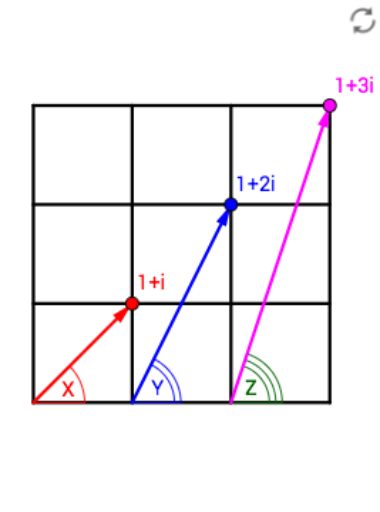
This example demonstrates the geometric interpretation of X+Y+Z using complex numbers. It involves core math concepts like complex numbers, vectors, angles, and geometric constructions. GeoGebra commands used include Intersect, Vector, Point, Angle, Sequence, and If. Suitable for high school and above, helping learners understand the connection between complex numbers and geometric figures and construction techniques.
GeoGebra Commands & Parameters
Intersect(xAxis, yAxis) → AVector(A, B) → uPoint(xAxis) → CVector(C, D) → vPoint(xAxis) → EVector(E, F) → wAngle(E, A, B) → αAngle(E, C, D) → βPoint(xAxis) → z_1Angle(z_1, E, F) → γSequence(Segment[(0, q), (3, q)], q, 0, 3) → list1Sequence(Segment[(q, 0), (q, 3)], q, 0, 3) → list2If(1 ≤ a < 2, Vector[(0, 0), Dilate[(0, 0), 2 - a, (1, 1)]], Vector[(1, 1)]) → bIf(3 ≤ a < 4, Vector[(1, 1), Dilate[(1, 1), 4 - a, (0, 2)]], Vector[(1, 1), (0, 2)]) → cIf(4 ≤ a < 5, Vector[(0, 2), Dilate[(0, 2), 5 - a, (-1, 3)]], Vector[(0, 2), (-1, 3)]) → dIf(6 ≤ a < 7, Vector[(0, 0), Dilate[(0, 0), 7 - a, (-1, 3)]], Vector[(0, 0), (-1, 3)]) → eIf(9 ≤ a < 10, Vector[(-4, 2), Dilate[(-4, 2), 10 - a, (-7, 1)]], Vector[(-4, 2), (-7, 1)]) → gIf(8 ≤ a < 9, Vector[(-1, 3), Dilate[(-1, 3), 9 - a, (-4, 2)]], Vector[(-1, 3), (-4, 2)]) → fIf(10 ≤ a < 11, Vector[(-7, 1), Dilate[(-7, 1), 11 - a, (-10, 0)]], Vector[(-7, 1), (-10, 0)]) → hIf(12 ≤ a < 13, Vector[Dilate[(0, 0), 13 - a, (-10, 0)]], Vector[(-10, 0)]) → iAngle((1, 0), (0, 0), (1, 1)) → δAngle((1, 1), (0, 0), (-1, 3)) → εAngle((-1, 3), (0, 0), (-10, 0)) → ζ