
Demonstrating Triangle Types
Loading the math board and drawing, please wait…
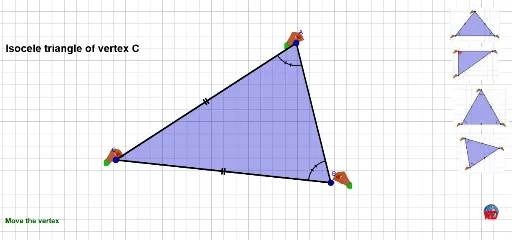
This example demonstrates how to draw and analyze different types of triangles (equilateral, isosceles, scalene) using GeoGebra. It involves core mathematical concepts such as triangle classification, coordinate geometry, angle measurement, and geometric construction. Key GeoGebra commands/objects used include Midpoint, Polygon, Line, Segment, Distance, Circle, Intersect, and Angle, as summarized in the construction abstract. It is suitable for high school mathematics education, helping students visually understand the geometric properties and classification methods of triangles.
GeoGebra Commands & Parameters
Midpoint(A, B) → OPolygon(A, B, C, D) → poly1, a_1, b_1, d_1, c_1Line(C, B) → jLine(D, C) → kLine(A, B) → lLine(D, A) → mMidpoint(D, C) → EMidpoint(A, B) → FSegment(E, F) → tMidpoint(b_1) → KMidpoint(c_1) → LLine(D, B) → c1Segment(C, A) → e1Segment(A, B) → f1Distance(A, B) → ccDistance(A, C) → bbDistance(C, B) → aaSegment(C, B) → aSegment(A, B) → g1Midpoint(d_1) → NCircle(A, 0.6) → cIntersect(c, d_1) → G,Intersect(c, a_1) → H,Line(G, a_1) → bLine(H, d_1) → dAngle(C, A, B) → αAngle(B, C, A) → βAngle(A, B, C) → γCircle(B, 0.6) → eIntersect(e, a_1) → J,Intersect(e, b_1) → M,Line(J, b_1) → fLine(M, a_1) → nIntersect(n, f) → IPolygon(I, J, B, M) → poly2, i, j_1, b_2, m_1Circle(C, 0.6) → gIntersect(g, d_1) → P,Intersect(g, b_1) → Q,Line(P, b_1) → hLine(Q, d_1) → pIntersect(p, h) → RPolygon(P, R, Q, C) → poly3, p_1, r, q, c_2Circle(A, 0.6) → sLine(G, a_1) → a1Line(H, d_1) → b1Intersect(a1, b1) → SPolygon(A, G, S, H) → poly4, a_2, g_1, s_1, h_1Angle(A, B, C) → δAngle(B, C, A) → εAngle(C, A, B) → ζAngle(B, C, A) → ηAngle(A, B, C) → θAngle(C, A, B) → ιAngle(C, A, B) → κAngle(A, B, C) → λAngle(B, C, A) → μ
AI Drawing Prompt Reference
Draw a quadrilateral and connect its diagonals. Inside, construct a midsegment by joining midpoints of opposite sides. From three vertices, draw small circles of equal radius; these circles intersect the quadrilateral's sides, creating points. Through these points, draw lines parallel to adjacent sides; their intersections form three smaller quadrilaterals near the vertices. Finally, measure and label the three interior angles of the original quadrilateral to illustrate triangle classification.
The prompt above was compiled from the original drawing commands and is for reference only.