
Demonstrating the Area of a Parallelogram Formula by GreenMaths
Loading the math board and drawing, please wait…
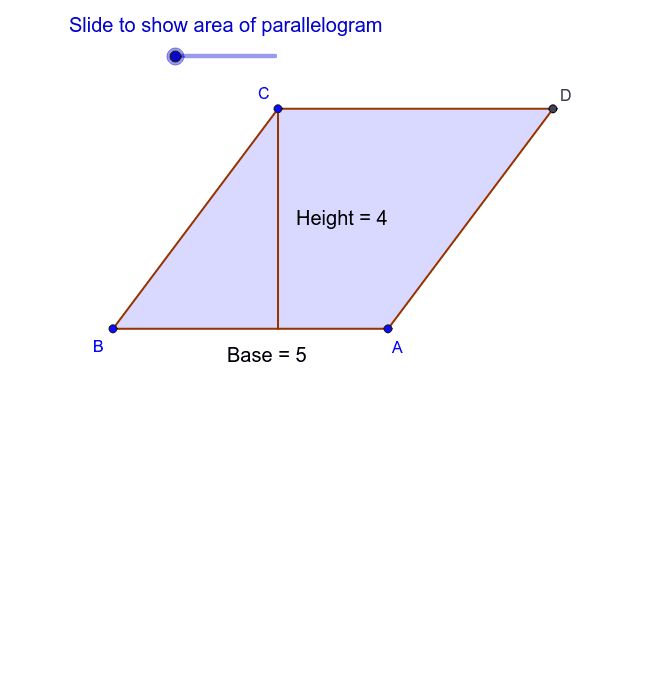
This example illustrates how the area formula for a parallelogram is derived. It involves core mathematical concepts such as parallelograms, area calculation, vectors, and trigonometric functions. The construction utilizes GeoGebra commands like Line, Intersect, OrthogonalLine, Vector, Angle, Polygon, and Translate. It is suitable for middle school and above students learning geometric properties and formula derivation.
GeoGebra Commands & Parameters
Line(A, B) → aLine(B, C) → bLine(C, a) → cLine(A, b) → dIntersect(c, d) → DOrthogonalLine(C, a) → eIntersect(a, e) → EOrthogonalLine(B, c) → fIntersect(c, f) → FVector(B, A) → uAngle(A, B, C) → αPolygon(A, E, C, D) → poly1, a_1, e_1, c_1, d_1Polygon(B, C, E) → poly2, e_2, b_1, c_2Translate(B, Vector[g * u]) → B'_1Translate(C, Vector[g * u]) → C'_1Translate(E, Vector[g * u]) → E'Polygon(B'_1, C'_1, E') → poly2', e', b', c'Polygon(A, B, F, D) → poly3, a_2, b_2, f_1, d_2Polygon(B, C, F) → poly4, f_2, b_3, c_3Translate(B, Vector[g * u]) → B'Translate(C, Vector[g * u]) → C'Translate(F, Vector[g * u]) → F'Polygon(B', C', F') → poly4', f', b'_1, c'_1Polygon(A, B, F, F') → poly5, a_3, b_4, f_3, f'_1Polygon(C, D, E', E) → poly6, c_4, d_3, e'_1, e_3
AI Drawing Prompt Reference
Draw a parallelogram and illustrate the derivation of its area formula. Start by drawing two adjacent sides of the parallelogram, then draw parallel lines through these sides to find the fourth vertex. Represent one side as a vector, calculate its length and the angle with the other side. Construct a similar but scaled-up parallelogram using the angle and side length, then compare the areas of the two parallelograms to visually demonstrate the area formula derivation.
The prompt above was compiled from the original drawing commands and is for reference only.