
Demonstrating Parallelogram Area by Malin Christersson
Loading the math board and drawing, please wait…
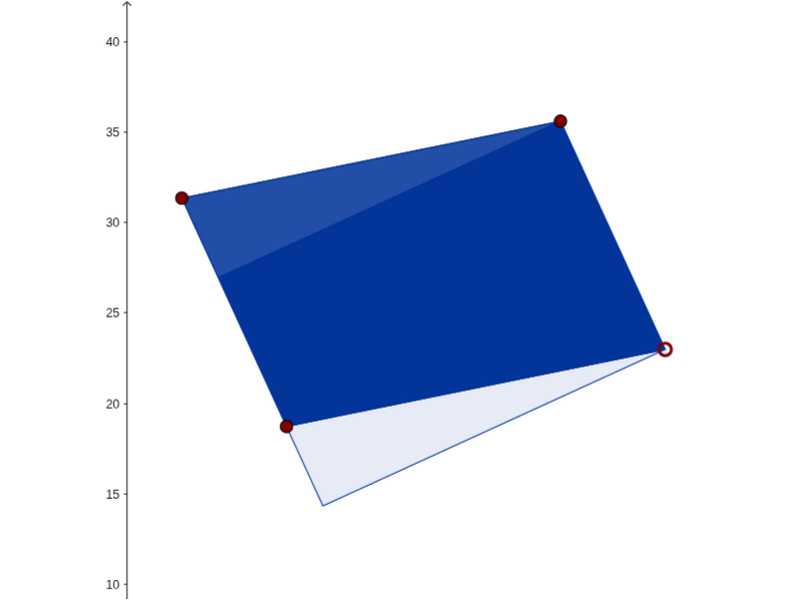
This example illustrates how a parallelogram can be cut and rearranged into a rectangle to calculate its area. It involves core math concepts like parallelograms, rectangles, area calculation, vectors, and translation transformations. GeoGebra commands and objects used include Line, Distance, OrthogonalLine, Intersect, Vector, Translate, and Polygon. Suitable for middle school and above mathematics education, demonstrating the derivation of the parallelogram area formula visually.
GeoGebra Commands & Parameters
Line(A, B) → l1_1Distance(A, B) → distABLine(C, l1_1) → l1_2Line(C, B) → l2_1OrthogonalLine(C, l2_1) → bOrthogonalLine(B, l2_1) → baLine(A, l2_1) → l2_2Intersect(l2_2, b) → CAIntersect(l2_2, ba) → BAIntersect(l1_2, l2_2) → DOrthogonalLine(D, l1_2) → daIntersect(l1_1, da) → DADistance(A, DA) → distAA'OrthogonalLine(C, l1_2) → aIntersect(l1_1, a) → CBIf(distAA' ≤ distAB, Polygon[A, DA, D]) → triangle1Vector(A, B) → uTranslate(triangle1, u) → triangle1'If(distAA' > distAB, Polygon[A, B, BA]) → triangle2Vector(A, D) → vTranslate(triangle2, v) → triangle2'If(distAA' > distAB, If[Distance[D, BA] < Distance[A, D], Polygon[BA, B, C, D], Polygon[C, CA, A, B]]) → quadri2If(distAA' ≤ distAB, If[Distance[B, DA] ≥ Distance[B, A], Polygon[C, CB, A, D], Polygon[D, DA, B, C]]) → quadri1If(Distance[B, DA] ≥ Distance[B, A], CB, DA) → A'Polygon(C, D, A, B) → poly1, c, d, a_1, b_1
AI Drawing Prompt Reference
Draw a parallelogram and demonstrate how to cut and rearrange it into a rectangle to calculate its area. Start by drawing two adjacent sides of the parallelogram, then draw perpendicular lines from each vertex to the opposite side to find the intersection points. Depending on the height relative to the base, cut the parallelogram into two triangles or a quadrilateral, translate them to the opposite side, and rearrange into a rectangle to visually show the area calculation.
The prompt above was compiled from the original drawing commands and is for reference only.