
Demonstrating Parallelogram Area by GreenMaths
Loading the math board and drawing, please wait…
In collections
Area - Rectangles, Triangles and Parallelograms
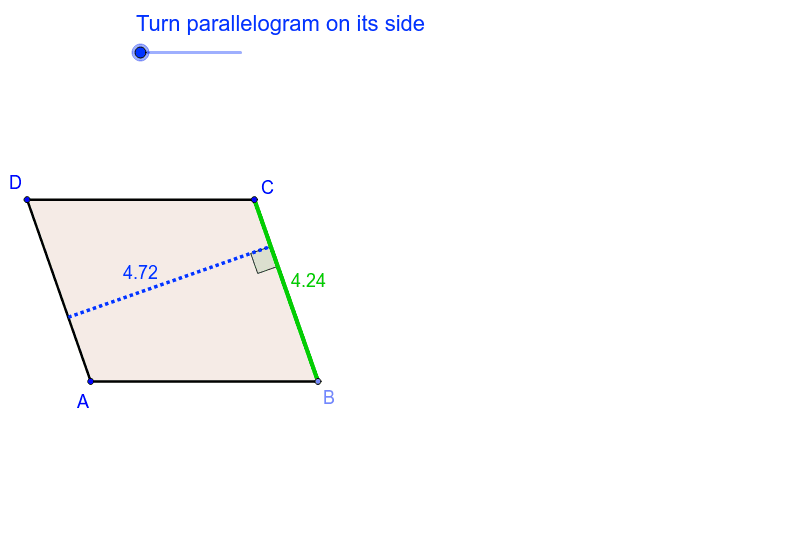
This example dynamically demonstrates the calculation of a parallelogram's area. Key math concepts include parallelograms, area formulas, vectors, and geometric transformations. GeoGebra commands and objects used in construction are Points, Rays, Segments, Lines, Intersect, Polygon, OrthogonalLine, Translate, Angle, Rotate. Suitable for middle school and above students to understand the geometric meaning and vector representation of the parallelogram area formula, and for introductory vector teaching in solid geometry.
GeoGebra Commands & Parameters
Point(xAxis) → QPoint(xAxis) → PRay(P, Q) → f_1Segment(O, N) → jPoint(f_1) → ALine(D, A) → aPoint(j) → BLine(B, a) → dLine(A, B) → bLine(D, b) → cIntersect(c, d) → CPolygon(A, B, C, D) → poly1, a_1, b_1, d_1, c_1Point(c_1) → GOrthogonalLine(C, b) → qIntersect(b, q) → MSegment(M, B) → rTranslate(C, u) → C'Translate(B, u) → B'Translate(G, u) → G'Translate(D, u) → D'Translate(A, u) → A'Angle(I, B, C) → γRotate(C', -θ, I) → C''Rotate(B', -θ, I) → B''Line(B'', C'') → sRotate(G', -θ, I) → G''Rotate(D', -θ, I) → D''Rotate(A', -θ, I) → A''Line(A'', D'') → lOrthogonalLine(G'', l) → mIntersect(a, b_1) → LSegment(L, D) → pPoint(a_1) → EOrthogonalLine(E, c) → eIntersect(c, e) → FSegment(F, E) → hSegment(F, D) → gSegment(C, F) → h_1OrthogonalLine(G, d) → iIntersect(d, i) → HSegment(G, H) → h_2Segment(H, B) → kAngle(G, H, B) → αAngle(B, E, F) → βPolygon(A', B', C', D') → poly1', a', b', c', d'Polygon(A'', B'', C'', D'') → poly1'', a'', b'', c'', d''Intersect(l, m) → KIntersect(m, s) → JSegment(K, J) → nAngle(C'', J, K) → δSegment(K, A'') → fSegment(A, B) → tSegment(B'', J) → e_1Segment(B, C) → g_1
AI Drawing Prompt Reference
Draw a parallelogram to demonstrate its area calculation. Start by plotting two points on the coordinate axes and draw a ray from the first point along the axis. Then, draw a line segment from the origin and use it along with the ray to form a parallelogram. Demonstrate the geometric meaning of the area formula using vector rotations and geometric transformations, labeling key points and angles, and finally show the rotated parallelogram and intersection points.
The prompt above was compiled from the original drawing commands and is for reference only.