
Demonstrating Congruence Using a Line of Symmetry
Loading the math board and drawing, please wait…
In collections
Similarity and Congruence Year 8 Pedagogies in Practice
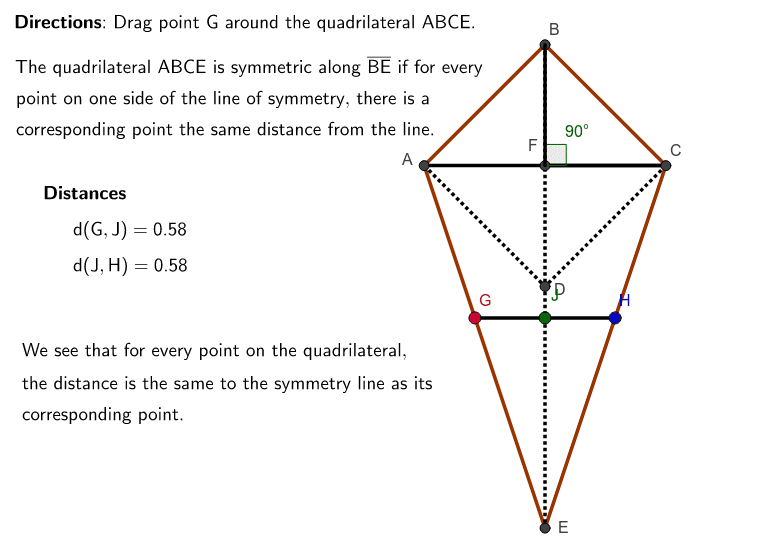
This GeoGebra example demonstrates how to use a line of symmetry (reflection) to prove that two geometric figures are congruent. The core mathematical concepts involved include congruence, symmetry, reflection transformation, quadrilaterals, polygons, and angle relationships. The construction uses GeoGebra commands such as Intersect, Polygon, Segment, Point, and Angle, together with objects including points A–F, segments a–g, polygon poly1, and reflected objects a_1, b_1, c_1, e_1, with text labels text1–text9 providing explanatory annotations. It is suitable for middle school geometry instruction, especially for classroom demonstrations or student inquiry activities on axial symmetry and congruence criteria.
GeoGebra Commands & Parameters
Intersect(b, e) → AIntersect(a, f) → BIntersect(c, e) → CIntersect(f, g) → DIntersect(d, f) → EIntersect(e, f) → FPolygon(A, B, C, E) → poly1, a_1, b_1, c_1, e_1Segment(B, E) → hSegment(A, D) → iSegment(C, D) → jSegment(A, F) → kSegment(F, C) → lPoint(poly1) → GSegment(H, J) → mSegment(J, G) → nSegment(B, F) → pSegment(F, C) → qAngle(B, F, C) → α
AI Drawing Prompt Reference
Draw a line of symmetry and construct two congruent quadrilaterals on opposite sides: first form a quadrilateral with four segments on one side of the axis, then reflect it across the axis to obtain the matching quadrilateral; connect corresponding vertices of the two quadrilaterals with segments, and mark the angle formed at the intersection of the symmetry axis with one of the edges.
The prompt above was compiled from the original drawing commands and is for reference only.