
Demonstrating Complex Number Addition and Subtraction
Loading the math board and drawing, please wait…
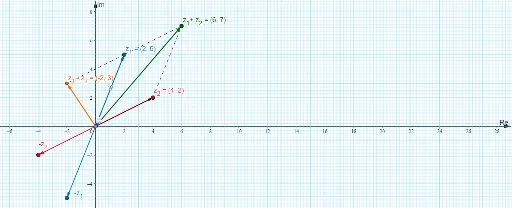
This example illustrates the geometric interpretation of complex number addition and subtraction in the complex plane. Key math concepts include complex numbers, complex plane, vectors, addition triangle rule, and subtraction vector rule. GeoGebra commands and objects like Point, Sequence, Length, RotateText, Line, Segment, and Vector are used to draw points corresponding to complex numbers, vectors, line segments, and text annotations. It is suitable for high school students learning about the geometric representation and operations of complex numbers.
GeoGebra Commands & Parameters
Point(Curve) → ASequence(Segment[(i, -10), (i, 100)], i, -50, 50, 0.1) → list3Length(Corner[3] - Corner[1]) → tRotateText("y", 0) → text3Line(B, C) → gSequence(Segment[(-10, i), (100, i)], i, -50, 50, 0.1) → list1Sequence(Segment[(-10, i), (100, i)], i, -50, 50, 1) → list2Sequence(Segment[(i, -10), (i, 100)], i, -50, 50, 1) → list4Point(list4) → z_2Point(list4) → ESegment(E, z_2) → hSegment(E, z_1) → iSegment(E, D) → jSegment(z_2, D) → kSegment(z_1, D) → lVector(E, z_2) → uVector(E, D) → vVector(E, z_1) → wVector(E, F) → aSegment(z_1, F) → mVector(E, H) → bVector(E, I) → c
AI Drawing Prompt Reference
Draw the geometric interpretation of complex number addition and subtraction in the complex plane. Start by drawing horizontal and vertical grid lines, marking the origin and unit circle. Then, plot two points corresponding to complex numbers and connect them to the origin to form two triangles, one for addition and one for subtraction. Use arrows to represent vectors from the origin to these points and label the corresponding complex numbers. Finally, add text annotations explaining the geometric rules for addition and subtraction.
The prompt above was compiled from the original drawing commands and is for reference only.