
Geometric construction for complex arithmetic with vectors and intersections
Loading the math board and drawing, please wait…
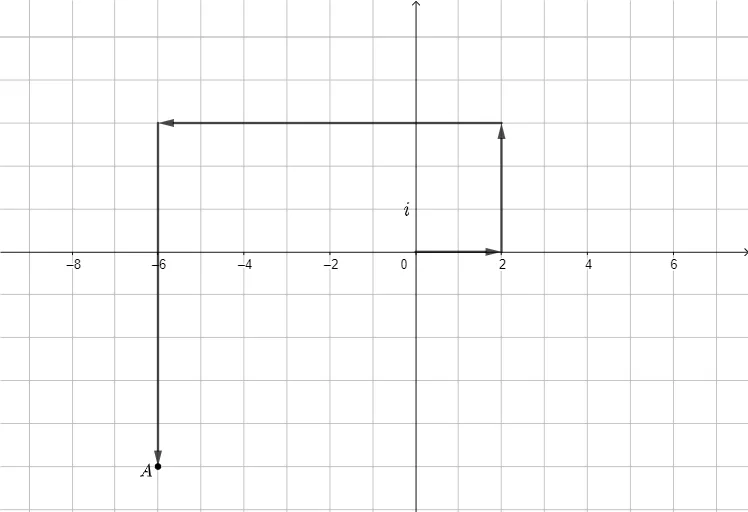
This example demonstrates how arithmetic operations on complex numbers can be visualized as planar vector operations. By constructing and combining vectors, it shows the geometric location corresponding to the resulting complex number (e.g., from sums/differences or scaled forms) using intersection points as the key computational step. The main mathematical ideas are the geometric interpretation of complex numbers (mapping real/imaginary parts to coordinates), vector-based composition underlying complex addition/subtraction, and construction of result points from vector relationships. Construction details extracted from the provided summary: it relies on GeoGebra commands Intersect, Point, and Vector, with objects A, B, u, C, v, D, w, E, a, and text1 used to represent base points/vectors, the intermediate geometric entities, and labeled outcomes. Suitable for late secondary school through early university courses, as an instructional tool for connecting complex-number algebra with coordinate geometry and geometric construction.
GeoGebra Commands & Parameters
Intersect(xAxis, yAxis) → APoint(xAxis) → BVector(A, B) → uVector(B, C) → vVector(C, D) → wVector(D, E) → a
AI Drawing Prompt Reference
Draw a Cartesian coordinate system with the origin and a point on the x-axis, then draw a vector from the origin to this point. From this point, draw two vectors to two other points, and from the second point, draw a vector to a fourth point. Finally, from the fourth point, draw a vector to a fifth point, using the start and end points of these vectors to represent the geometric meaning of complex numbers and the relationship of vector operations.
The prompt above was compiled from the original drawing commands and is for reference only.