
Degree to Radian Conversion Illustrator
Loading the math board and drawing, please wait…
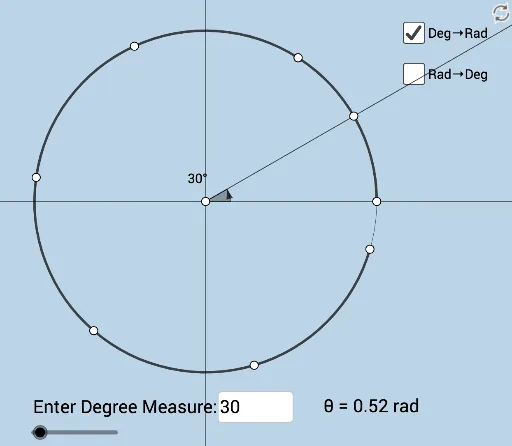
This example dynamically demonstrates the conversion between degree-minute-second and radian angle measurements. It involves core math concepts like angle unit conversion, trigonometric functions, and function graphing. GeoGebra commands used include Ray, Point, Circle, Rotate, Angle, Textfield, and CircleArc for construction. Suitable for high school mathematics education to help students understand angle unit conversion and its practical applications.
GeoGebra Commands & Parameters
Ray(A, B) → fPoint(f) → CCircle(A, C) → cRotate(C, a, A) → C'Ray(A, C') → gRotate(C, (d * π / 180), A) → C'_1Angle(C, A, C'_1) → αRay(A, C'_1) → hTextfield(d) → InputBox1Textfield(a) → InputBox2Rotate(C, 1, A) → C'_2Rotate(C'_2, 1, A) → DRotate(D, 1, A) → D'Rotate(D', 1, A) → D''Rotate(D'', 1, A) → D'''Rotate(D''', 1, A) → ECircleArc(A, C, C'_2) → kCircleArc(A, C'_2, D) → pCircleArc(A, D, D') → qCircleArc(A, D', D'') → rCircleArc(A, D'', D''') → sCircleArc(A, D''', E) → tCircleArc(A, E, C) → c_1Angle(C, A, C') → β
AI Drawing Prompt Reference
Create an angle unit conversion diagram showing the conversion between degrees and radians. Start by drawing a ray, then take a point on the ray and draw a circle with this point as the center. Rotate this point to form new points and rays, and use these to construct multiple arcs, demonstrating the process of angle measurement unit conversion. Finally, add text input boxes for entering degree and radian values.
The prompt above was compiled from the original drawing commands and is for reference only.