
Decomposing Proper Fractions
Loading the math board and drawing, please wait…
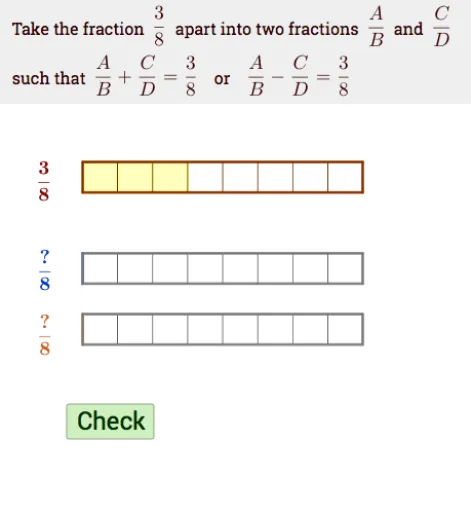
This example demonstrates how to decompose proper fractions into simpler fractions. Key mathematical concepts include fractions, vectors, and geometric construction. Using GeoGebra commands such as Intersect, Point, Vector, and Sequence, the example constructs an intuitive geometric figure. Suitable for high-grade elementary and junior high school students to learn fraction decomposition and geometric construction.
GeoGebra Commands & Parameters
Intersect(xAxis, yAxis) → AIf(a_1 > 1, a_1 - 1, 0) → wPoint(yAxis) → GPoint(xAxis) → BVector(A, FN) → u_1Vector(A, M) → vSequence((i / m_1, y(A)), i, 1, m_1) → L_{30}Join({{A}, L_{30}}) → L_3Polygon(A, B, 4) → poly1, f, g, h, i, C, DPolygon(A, Element[L_3, abs(l_1) + 1], (x(Element[L_3, abs(l_1) + 1]), y(D)), D) → F2, a, b, c, dPoint(yAxis) → EPolygon(G, H, 4) → poly2, j, k, l, m, I, JPolygon(E, F, 4) → poly3, n, p, q, r, K, LSequence((i / i_1, y(G)), i, 1, i_1) → L_{10}Join({{G}, L_{10}}) → L_1Sequence(Polygon[Element[L_1, i], Element[L_1, i + 1], (x(Element[L_1, i + 1]), y(J)), (x(Element[L_1, i]), y(J))], i, 1, n_1) → N_gSequence(Polygon[Element[L_1, i], Element[L_1, i + 1], (x(Element[L_1, i + 1]), y(J)), (x(Element[L_1, i]), y(J))], i, 1, i_1) → D_gSequence((i / k_1, y(E)), i, 1, k_1) → L_{20}Join({{E}, L_{20}}) → L_2Sequence(Polygon[Element[L_2, i], Element[L_2, i + 1], (x(Element[L_2, i + 1]), y(L)), (x(Element[L_2, i]), y(L))], i, 1, k_1) → D_1Sequence(Polygon[Element[L_2, i], Element[L_2, i + 1], (x(Element[L_2, i + 1]), y(L)), (x(Element[L_2, i]), y(L))], i, 1, j_1) → N_1Sequence(Polygon[Element[L_3, i], Element[L_3, i + 1], (x(Element[L_3, i + 1]), y(D)), (x(Element[L_3, i]), y(D))], i, 1, m_1) → D_2Polygon(E, Element[L_2, j_1 + 1], (x(Element[L_2, j_1 + 1]), y(L)), L) → F1, e, s, t, l_2Vector(E, G) → uIf(a_1 ≤ 1, a_1, 1) → oTranslate(F2, Vector[If[l_1 ≥ 0, Vector[(v * w)], Vector[(u_1 * w)]]]) → F2'Translate(F1, Vector[(u * o)]) → F1'Textfield(ma) → InputBox1FractionText(ans) → ffTextfield(j_1) → InputBox2Textfield(k_1) → InputBox3Textfield(l_1) → InputBox4Textfield(m_1) → InputBox5Segment((x(EN), y(EN) - 0.1), (x(EN), y(J) + 0.1)) → f_1Segment((x(EN), y(EN) - 0.1), (x(EN), y(J) + 0.1)) → g_1Sequence(Polygon[Element[L_3, i], Element[L_3, i + 1], (x(Element[L_3, i + 1]), y(D)), (x(Element[L_3, i]), y(D))], i, 1, abs(l_1)) → N_2Semicircle(LN, R) → q_1Semicircle(R, RP) → r_1
AI Drawing Prompt Reference
Draw a figure containing multiple rectangles and semicircles. Start by drawing points A and B on the axes, then construct vectors u1 and v through points A and B. Next, use vectors u1 and v to construct a series of rectangles L3 and connect them to form L3. Then, construct points G and E, and use these points to construct a series of rectangles L1 and L2, connecting them to form L1 and L2. Finally, use L1 and L2 to construct a series of rectangles D1 and N1, as well as a series of semicircles q1 and r1.
The prompt above was compiled from the original drawing commands and is for reference only.