
Decimal Place Value Demo
Loading the math board and drawing, please wait…
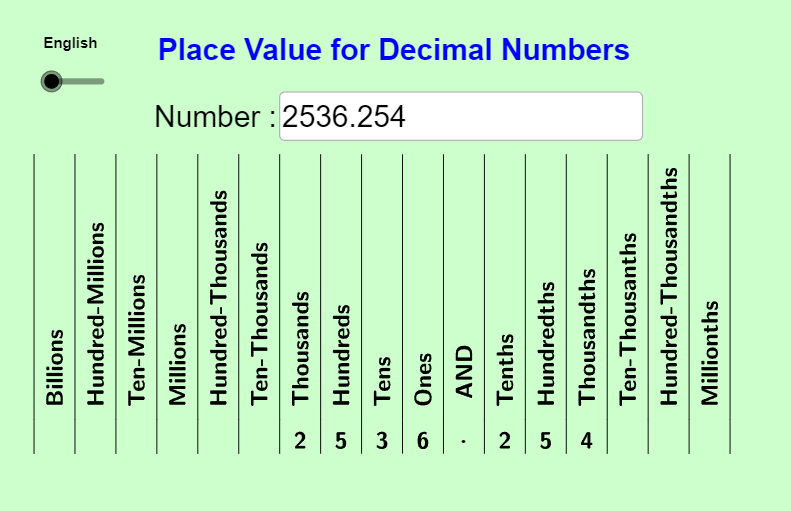
This example demonstrates how to represent decimal numbers and their place values. It allows users to input a number and displays it with labeled columns. Key math concepts include decimals, place values, and the decimal system. Constructed using GeoGebra commands like Reverse, Textfield, IndexOf, Take, Sequence, TableText, Element, involving objects such as textList, value, InputBox1, text2, decPt, text3, textList_{sp}, numLIst, text1, table1, table2, textList_{fr}, table3, textList_{ge}, table4, n, langList, lang. Suitable for elementary and middle school mathematics education to help students understand decimal structures.
GeoGebra Commands & Parameters
Reverse({"Millionths", "Hundred-Thousandths", "Ten-Thousanths", "Thousandths", "Hundredths", "Tenths ", "\bold AND", "Ones", "Tens", "Hundreds", "Thousands", "Ten-Thousands", "Hundred-Thousands", "Millions", "Ten-Millions", "Hundred-Millions", "Billions"}) → textListTextfield(value) → InputBox1IndexOf(".", text2) → decPtTake(text2, decPt - 10, decPt + 6) → text3Reverse({"Millonésimas", "Cien milésimas", "Diez milésimas", "Milésimas", "Centésimas", "Décimas", "\bold Y", "Unidades", "Decenas", "Centenas", "Unidades de millar", "Decenas de millar", "Centenas de millar", "Unidades de millón", "Decenas de millón", "Centenas de millón", "Unidades de millar de millón"}) → textList_{sp}Sequence(Take["" + text3, k, k], k, 1, Length["" + text3]) → numLIstTableText({Zip[RotateText[T, 90°], T, textList], Zip[If[T ≟ ".", UnicodeToLetter[8231], T], T, numLIst]}, "c|h") → table1TableText({Zip[RotateText[T, 90°], T, textList_{sp}], Zip[If[T ≟ ".", UnicodeToLetter[8231], T], T, numLIst]}, "c|h") → table2TableText({Zip[RotateText[T, 90°], T, Reverse[textList_{fr}]], Zip[If[T ≟ ".", UnicodeToLetter[8231], T], T, numLIst]}, "c|h") → table3TableText({Zip[RotateText[T, 90°], T, Reverse[textList_{ge}]], Zip[If[T ≟ ".", UnicodeToLetter[8231], T], T, numLIst]}, "c|h") → table4Element(langList, n) → lang
AI Drawing Prompt Reference
Create a decimal number and its place value representation diagram. Users input a number, which is then displayed with corresponding labels for each place value, such as millionths, hundred-thousandths, and so on. Generate label lists in both Chinese and English, and show the corresponding place values based on the input number.
The prompt above was compiled from the original drawing commands and is for reference only.