
David Star Slided Geometric Demo
Loading the math board and drawing, please wait…
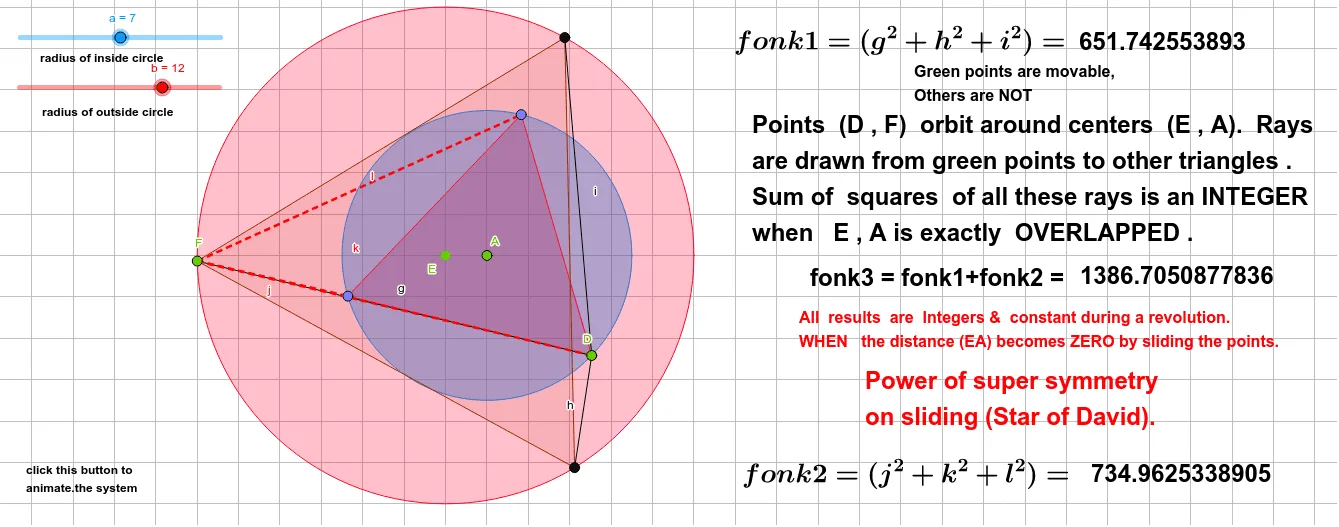
This example demonstrates the geometric transformations and properties of the David star figure. It involves core concepts like polygon construction, geometric transformations (rotation), geometric mean, and coordinate geometry. The construction uses commands such as Circle, Point, Rotate, Polygon, and Segment to build the figure dynamically, suitable for high school and above students exploring geometric transformations, coordinate geometry, and polygon properties.
GeoGebra Commands & Parameters
Circle(A, a) → cPoint(c) → DRotate(D, 120°, A) → D'Rotate(D', 120°, A) → D''Polygon(D', D, D'') → t1, d'', d', dCircle(E, b) → ePoint(e) → FRotate(F, 120°, E) → TRotate(T, 120°, E) → MPolygon(T, F, M) → t2, f'', f', fSegment(D, F) → gSegment(D, T) → hSegment(D, M) → iSegment(F, D'') → jSegment(F, D) → kSegment(F, D') → l
AI Drawing Prompt Reference
Draw a David star by first drawing a circle and selecting point D on the circle, then rotating point D around point A twice by 120 degrees to get points D' and D'', and drawing triangle t1 with D', D, and D'' as vertices. Repeat this process by rotating point F around point E twice by 120 degrees to get points T and M, and drawing triangle t2 with T, F, and M as vertices. Finally, draw line segments connecting points D, F, D', F, D, F, D', F, and D'.
The prompt above was compiled from the original drawing commands and is for reference only.