
Area of a Kite - Exploration
Loading the math board and drawing, please wait…
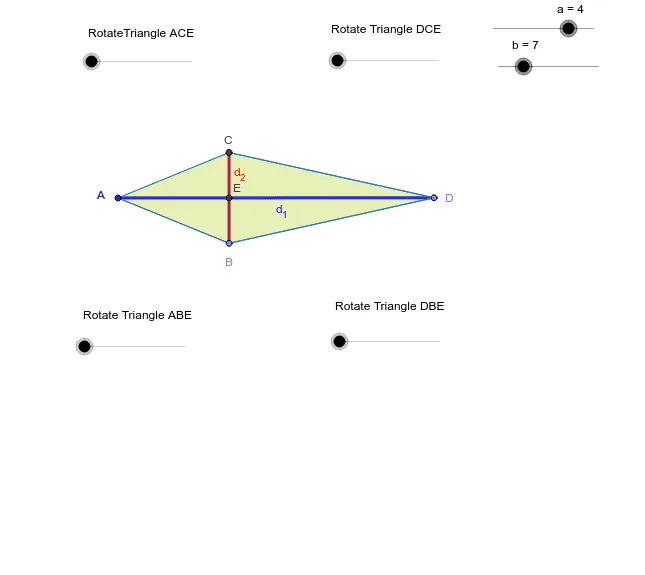
①This GeoGebra example provides an interactive exploration of the area formula for a kite, allowing users to drag vertices and observe how the area changes dynamically. ②Core mathematical concepts include the definition of a kite (two pairs of adjacent equal sides), the property of perpendicular diagonals, and the area formula S = (d₁ × d₂)/2, where d₁ and d₂ are the lengths of the diagonals. ③Construction details: based on the summary, the construction uses commands such as Point, Segment, Circle, Intersect, Polygon, Midpoint, Mirror, and Rotate, creating the kite polygon ABCD, its diagonals, auxiliary circles, and symmetry transformations. Additional tools like linear regression or 3D vectors may be used to analyze relationships between area and diagonal lengths. ④This resource is suitable for middle and high school geometry classes, ideal for teaching quadrilateral area formulas, diagonal properties, and dynamic geometric exploration, as well as for student-led investigations into area relationships and transformation geometry.
GeoGebra Commands & Parameters
Point(Circle[A, a]) → BSegment(A, B) → b_3Circle(A, B) → cPoint(Circle[B, b]) → DSegment(B, D) → fCircle(D, B) → gIntersect(c, g, 1) → CSegment(A, C) → dSegment(C, D) → hSegment(A, D) → d_1Segment(B, C) → d_2Intersect(d_1, d_2) → E_1Polygon(C, E_1, D) → P, d_4, c_1, e_1Polygon(E_1, B, D) → Q, d_3, e_2, b_1Polygon(E_1, C, A) → R, a_1, e_3, c_2Polygon(E_1, B, A) → S, a_2, e_4, b_2Midpoint(C, D) → FMirror(C, F) → C'Mirror(E_1, F) → E'Mirror(D, F) → D'Midpoint(A, C) → GMidpoint(A, B) → HMidpoint(B, D) → IMirror(E_1, G) → E'_1Mirror(C, G) → C'_1Mirror(A, G) → A'Mirror(E_1, H) → E'_2Mirror(B, H) → B'Mirror(A, H) → A'_1Mirror(E_1, I) → E'_3Mirror(B, I) → B'_1Mirror(D, I) → D'_1Midpoint(B, C) → ERotate(E_1, α, G) → E_1'Rotate(C, α, G) → C'_2Rotate(A, α, G) → A'_2Polygon(E_1', C'_2, A'_2) → R', a'_2, e_1', c'_2Rotate(C, -β, F) → C'_4Rotate(E_1, -β, F) → E_3Rotate(D, -β, F) → D'_3Polygon(C'_4, E_3, D'_3) → P', d'_3, c'_4, e_5Rotate(E_1, γ, H) → E_2Rotate(B, γ, H) → B'_2Rotate(A, γ, H) → A'_3Polygon(E_2, B'_2, A'_3) → S', a'_3, e_6, b'_2Rotate(E_1, -δ, I) → E_4Rotate(B, -δ, I) → B'_3Rotate(D, -δ, I) → D'_2Polygon(E_4, B'_3, D'_2) → Q', d'_2, e_7, b'_3
AI Drawing Prompt Reference
Draw a kite shape to illustrate its area formula. Include two perpendicular diagonals intersecting at point E. Show how the area changes by dragging vertices. Construct the kite using auxiliary circles and symmetry transformations, forming four triangles. Label the lengths of the diagonals. Add a slider to demonstrate the area formula S = (d₁ × d₂)/2, where d₁ and d₂ are the diagonal lengths.
The prompt above was compiled from the original drawing commands and is for reference only.