
Reflection Activity 7: Triangle Mirror Transformation
Loading the math board and drawing, please wait…
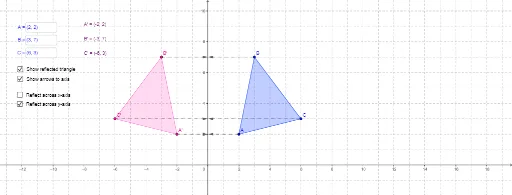
①This example demonstrates the reflection (mirror) transformation of a triangle about a coordinate axis (x-axis or y-axis), dynamically showing the relationship between the original triangle and its reflected image. ②Core mathematical concepts include axial symmetry (reflection) in plane geometry, involving symmetry properties, perpendicular bisectors of corresponding point segments, and sign changes in vertex coordinates. ③Construction details: The Polygon command creates the original triangle; If and Vector commands define reflection vectors; Textfield input boxes control the visibility of the reflection axis (x-axis or y-axis); the reflected triangle and its vertices (A', B', C') are generated, along with arrows and text labels. ④Suitable for middle school geometry lessons, this interactive tool helps students intuitively grasp properties of reflection, such as congruence and orientation reversal, and can be used as a dynamic exploration activity.
GeoGebra Commands & Parameters
Polygon(A, B, C) → poly1_1, c_1, a_1, b_1If(xAxisOn ≟ true, Mirror[A, xAxis], Mirror[A, yAxis]) → A'If(xAxisOn ≟ true, Mirror[B, xAxis], Mirror[B, yAxis]) → B'If(xAxisOn ≟ true, Mirror[C, xAxis], Mirror[C, yAxis]) → C'Polygon(A', B', C') → poly1, c', a', b'If(xAxisOn ≟ true, (x(A), 0), (0, y(A))) → A_vVector(A, A_v) → u_1Vector(A', A_v) → u_2If(xAxisOn ≟ true, (x(B), 0), (0, y(B))) → B_vVector(B, B_v) → v_1Vector(B', B_v) → v_2If(xAxisOn ≟ true, (x(C), 0), (0, y(C))) → C_vVector(C, C_v) → w_1Vector(C', C_v) → w_2Textfield(B) → inputBoxBTextfield(A) → inputBoxATextfield(C) → inputBoxC
AI Drawing Prompt Reference
Draw a triangle and reflect it across either the x-axis or y-axis, producing a congruent but oppositely oriented triangle. Use a toggle to choose the reflection axis, and show arrows from each original vertex to the axis and then to its reflected counterpart, illustrating the symmetry. Place editable text boxes at the three vertices to adjust their coordinates, updating the figure dynamically. The scene emphasizes axial symmetry in a coordinate plane, with perpendicular bisectors connecting corresponding points.
The prompt above was compiled from the original drawing commands and is for reference only.