
Dandelin Spheres Demo by Cindy Cortez
Loading the math board and drawing, please wait…
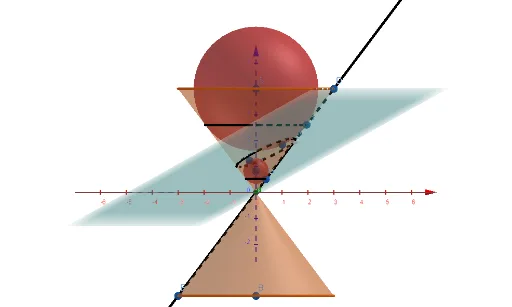
This example dynamically demonstrates Dandelin spheres to illustrate the geometric properties of conic sections (ellipse, parabola, hyperbola), revealing their relationship with the cone's cross-section. Key math concepts include cones, polygons, trigonometry, and analytical geometry. Construction highlights use of GeoGebra commands like Point, Intersect, Cone, Line, Sphere, IntersectConic, Circle, PointIn, Plane, Ellipse, etc., to build cone-sphere intersections and cross-sections. Suitable for high school and above learners to understand the generation principles and geometric intuition of conic sections.
GeoGebra Commands & Parameters
Point(zAxis) → APoint(zAxis) → BIntersect(yAxis, zAxis) → CCone(A, C, 3) → a, c, bCone(B, C, 3) → d, e, fPoint(c) → DPoint(e) → ELine(D, E) → gPoint(zAxis) → FPoint(g) → GSphere(F, G) → hPoint(g) → HSphere(A, H) → iIntersectConic(i, h) → kIntersectConic(h, i) → pCircle(zAxis, H) → qCircle(zAxis, G) → rPointIn(h) → IPointIn(i) → JPoint(g) → KPlane(I, J, K) → p_1Ellipse(I, J, K) → s
AI Drawing Prompt Reference
Draw a cone with a vertex A and a base circle center C, forming two conical surfaces a and c. On conical surface a, take point D; on conical surface c, take point E, and connect DE to get line g. On the z-axis, take point F; on line g, take point G, and draw a sphere h with F and G as radii. On conical surface c, take point H, and draw a sphere i with H as radius. The intersection of sphere h and sphere i forms an ellipse k, and the intersection of sphere i and sphere h forms an ellipse p. On the z-axis, draw a circle q with G as radius and a circle r with H as radius. On sphere h, take point I; on sphere i, take point J; on line g, take point K, and define a plane p_1 with points I, J, and K. This plane intersects the cone to form an ellipse s.
The prompt above was compiled from the original drawing commands and is for reference only.